
Overview of the VNISH interface (Dashboard)
The VNISH firmware interface is designed for convenient management of ASIC miners and easy monitoring of key device operating parameters. The main element of the system is the Dashboard, which displays the current mining status, equipment performance, temperature readings and other technical information. This approach allows miner owners to quickly assess operational stability without having to navigate to additional sections. The main panel acts as a miner monitoring centre, bringing together key widgets showing performance, power consumption, temperature, pool connections and equipment status. This enables the user to instantly detect any anomalies in the system’s operation and promptly make decisions regarding device configuration or maintenance. The VNISH interface is optimised for use with Antminer miners, so all information is presented in a clear format, with a distinct division into functional blocks.
Miner hashrate
Purpose of the widget
The hashrate widget displays a key indicator of the miner’s performance. It shows the speed of cryptographic calculations used for cryptocurrency mining. The value can be displayed in GH/s or TH/s depending on the hardware model. This parameter allows you to compare the device’s actual performance with the expected performance and assess the stability of mining.
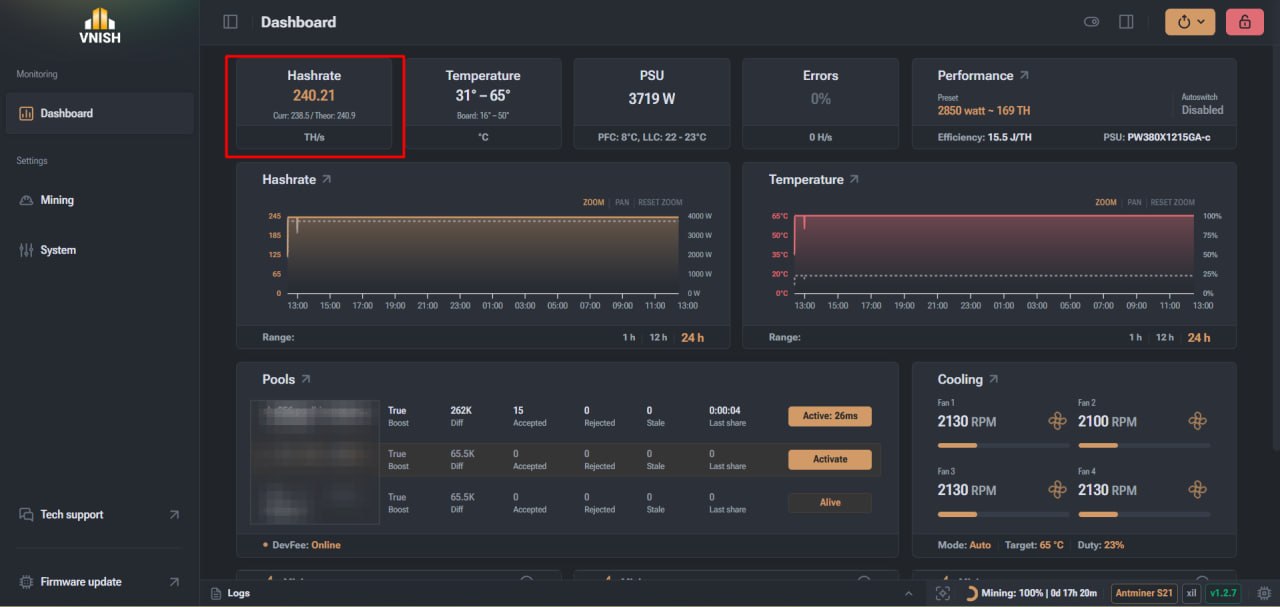
Widge metrics
The widget displays three main values:
- ► Hash rate – the instantaneous hash rate value, which reflects the miner’s actual operating speed at a given moment.
- ► Theor. (theoretical) – the calculated hash rate, determined by a formula based on the ASIC chip model and its current clock frequency. This value does not change until the set operating frequency of the chips is changed.
- ► Current – the average hashrate over a 15-second interval, which allows you to assess the actual stability of the miner’s operation.
Stable hashrate values indicate that the equipment is operating correctly and that the mining settings are optimal.
ASIC component temperature
Purpose of the widget
The temperature widget displays the heating levels of the miner’s main components. It allows you to monitor the condition of the ASIC chips and detect the risk of overheating in good time. Temperature monitoring is critical for stable equipment operation, as exceeding permissible values can lead to reduced performance or the miner shutting down automatically.
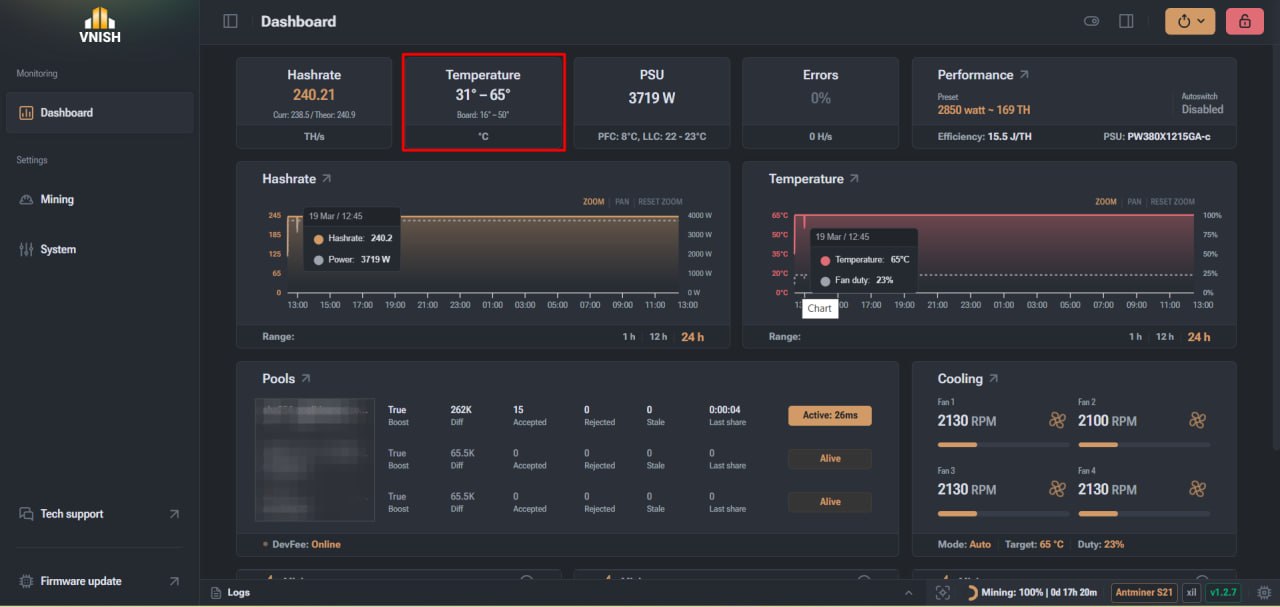
Temperature readings
The widget displays two types of temperature readings:
- ► ASIC chip temperature
- ► PCB temperature
The chip temperature reflects the actual heat generated by the computing modules, whilst the board temperature allows you to assess the overall thermal condition of the system.
Temperature reading features may vary depending on the miner series:
- ► in the S19 series, data is read by the controller via the I2C bus from sensors on the hash boards
- ► in the S21 series, the temperature is measured directly on each ASIC chip
Power consumption
Indicator value
The power consumption widget displays the amount of electricity the miner uses during operation. This parameter allows you to assess the energy efficiency of the equipment and forecast electricity costs. For APW12-type power supplies in S19 series miners, the figure is calculated using an empirical formula that takes into account the active auto-tuning profile.
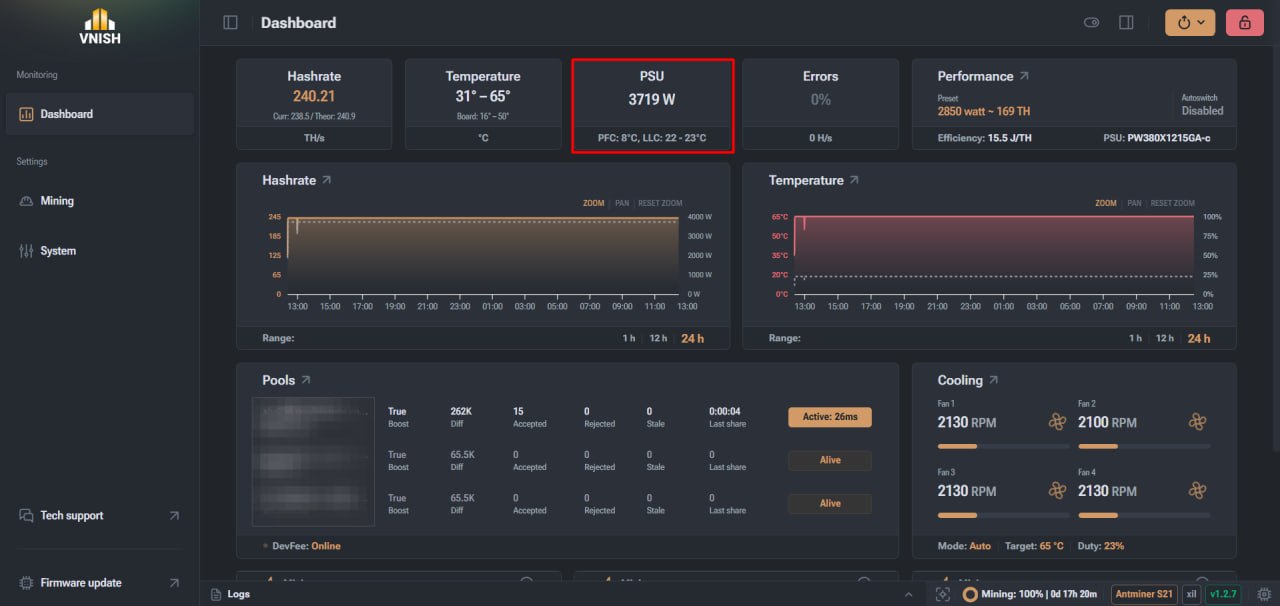
Additional metrics
New power supplies, such as the APW171215c, also display:
- ► the miner’s actual power consumption
- ► the temperature of the power supply unit’s power components
This information helps to monitor the operation of the power supply system and identify potential problems in a timely manner.
Errors
Purpose of the widget
The error widget displays the proportion of the hashrate that contains errors and is not accepted by the mining pool as a valid result. The metric is displayed as a percentage and an absolute value, allowing you to assess the performance of the ASIC.
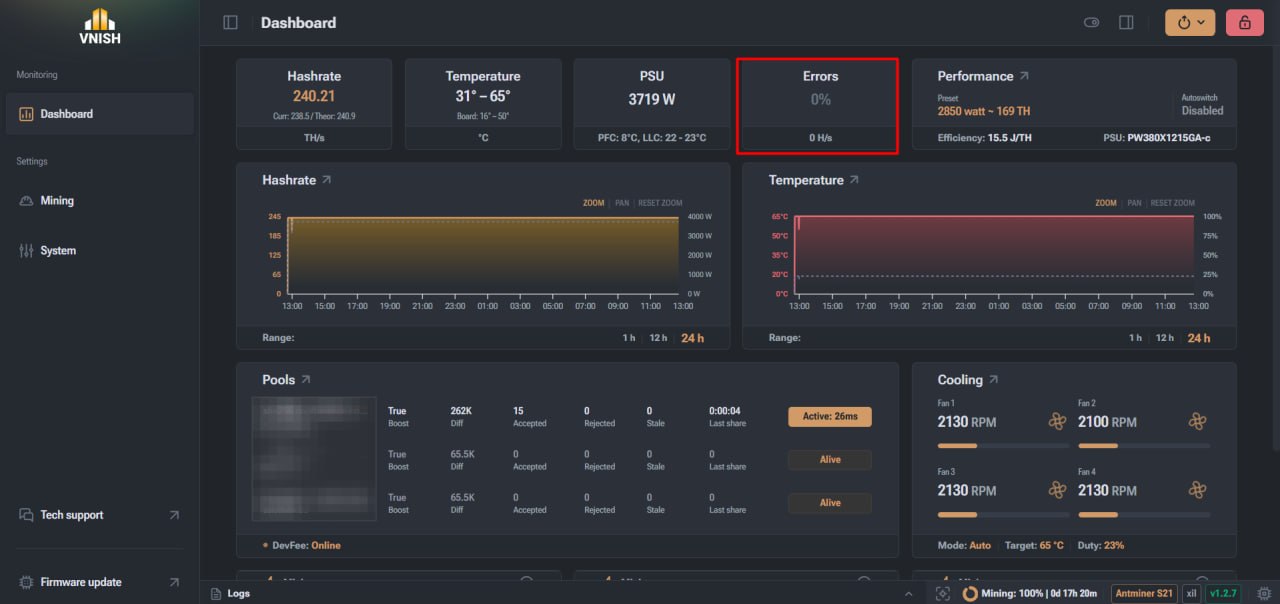
An elevated error rate may indicate:
- ► unstable frequencies
- ► equipment overheating
- ► power supply issues
- ► hardware faults in the hash boards
Monitoring this parameter helps maintain maximum mining efficiency.
Miner performance
The performance widget combines the device’s key operating parameters, including frequencies, voltage and mining efficiency. If the auto-tuning profile is not enabled on the device, the widget displays global frequency and voltage parameters. In this mode, efficiency calculations may not be available.
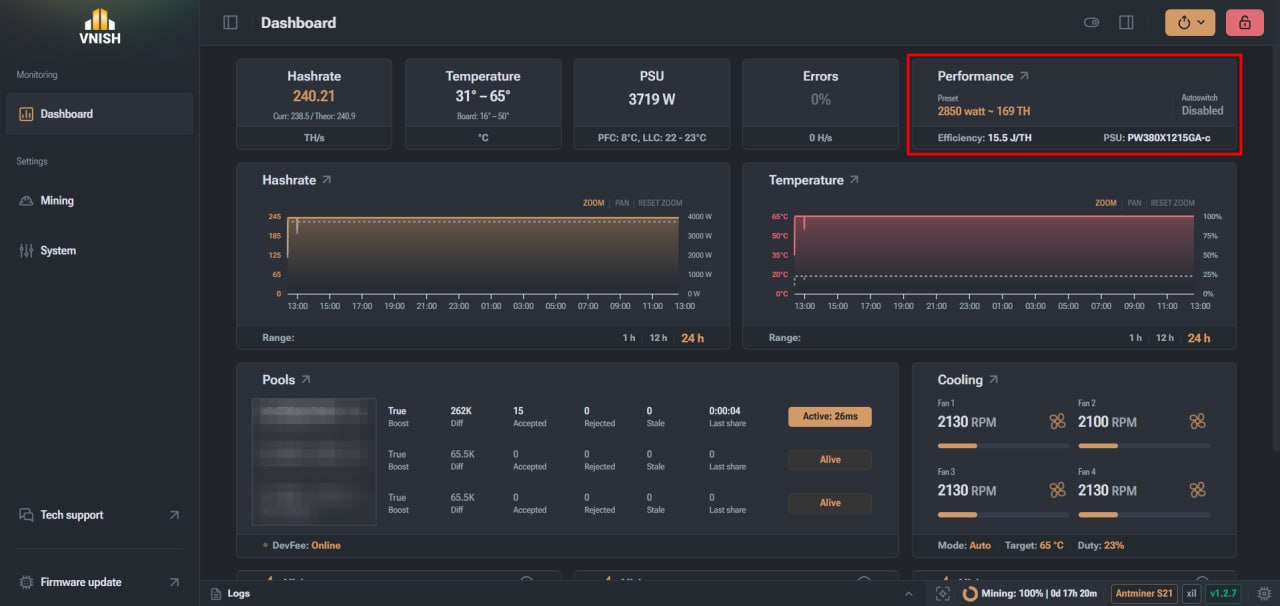
When using an auto-tuning profile, the widget displays:
- ► profile name
- ► estimated power
- ► actual hash rate
- ► efficiency in J/GH
The presence of the ‘tuned’ indicator means that the miner has been successfully configured for the selected profile.
Miner performance graphs
The graphical module allows you to analyse changes in the miner’s parameters over time.
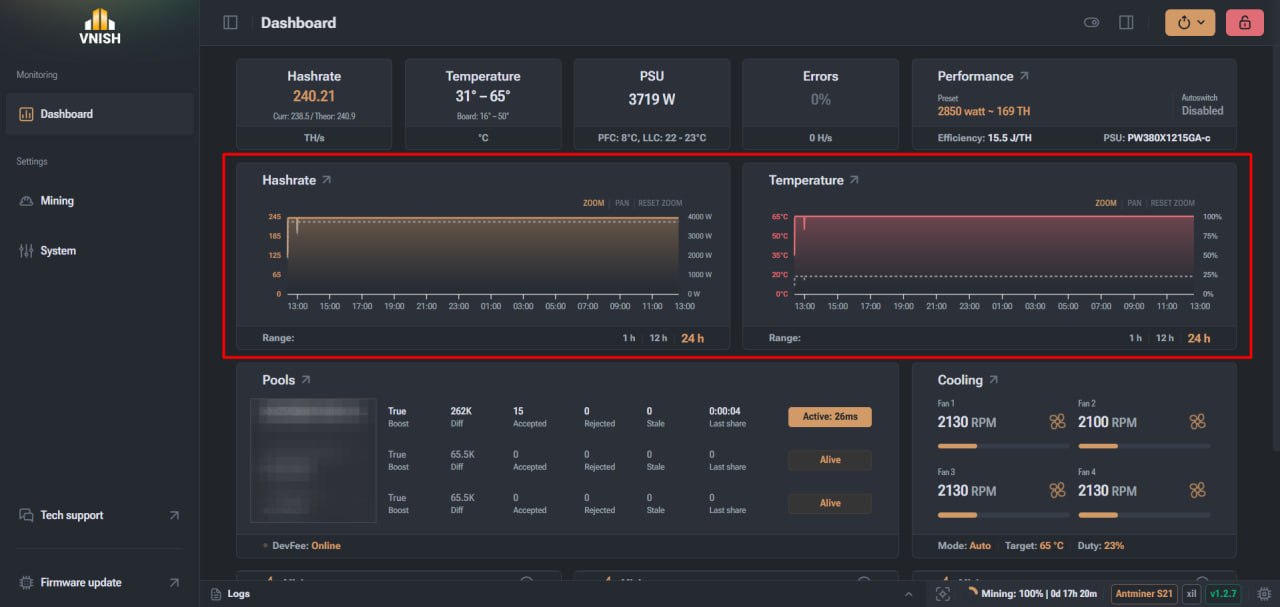
The main graphs display:
- ► changes in hash rate
- ► component temperatures
- ► fan speed
- ► power consumption
This data helps to monitor the miner’s stability and analyse the impact of temperature or errors on performance.
Pools
The Pools section displays information about the miner’s connection to mining servers.
Key parameters
The pools table displays the following metrics:
- ► pool address
- ► connection status
- ► block difficulty
- ► number of accepted blocks
- ► number of rejected blocks
- ► stale blocks
- ► connection delay
A high number of accepted blocks indicates stable miner operation and a correct connection to the pool. The first pool in the list is used as the primary one. If the connection to it is lost, the miner automatically switches to the backup server.
Miner cooling
Fan control
The cooling section displays information about the miner’s fan operation.
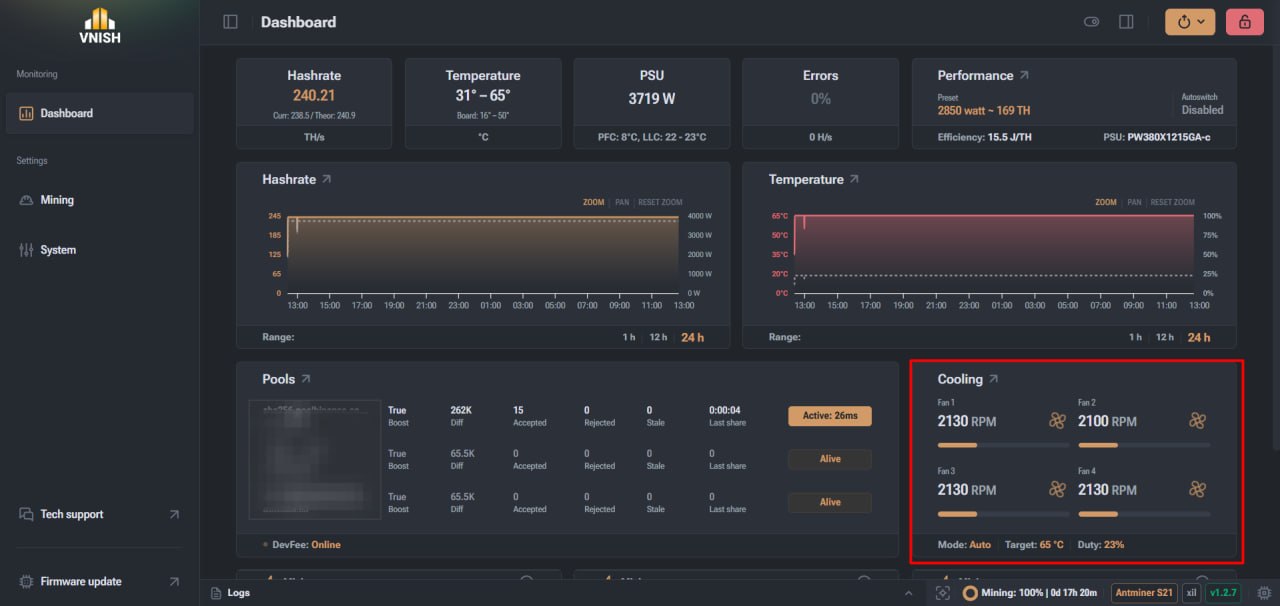
Here you can see:
- ► fan speed in RPM (revolutions per minute)
- ► fan load level
- ► the current status of the fans
Stable RPM values indicate that the cooling system is working correctly.
Interpreting the data
If the RPM value is missing or an error status is displayed, this may indicate a fan fault or a connection issue. An excessively high Fan Duty level (fan load percentage) at a stable temperature may indicate an aggressive cooling mode.
Hashboards
This section is designed for a detailed analysis of each hashrate board’s performance.
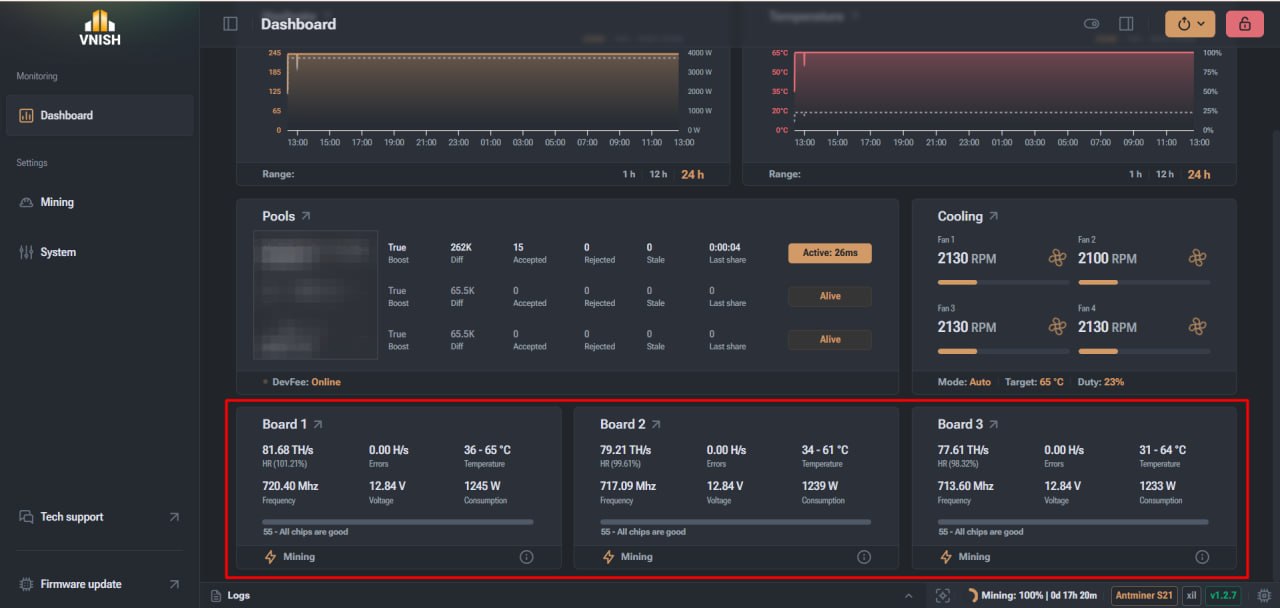
The following are displayed for each board:
- ► hash rate
- ► number of errors
- ► temperature
- ► chip operating frequency
- ► voltage
- ► power consumption
Comparing parameters between boards helps to identify faults or degradation of individual ASIC chips.
Status bar
The status bar is located at the bottom of the interface and displays key technical information about the miner.
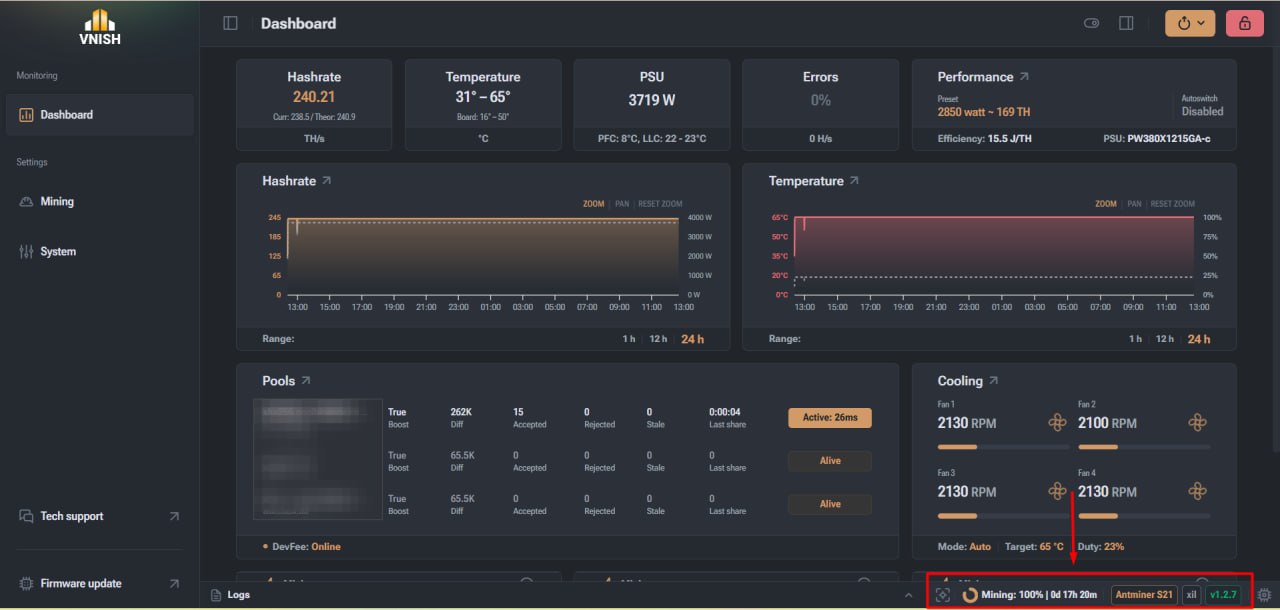
It shows:
- ► the miner’s current operating status
- ► continuous operating time
- ► device model
- ► the type of control board
- ► firmware version
This element is the primary source of information when diagnosing problems.
The VNISH home screen as the miner’s monitoring hub
Dashboard brings together all key metrics, such as hash rate, temperature, power consumption, fan operation, pool status and hashrate parameters, providing a complete overview of the device’s status in one place. Thanks to the clear layout of the widgets and the logical organisation of the information, the user can quickly identify anomalies in the miner’s operation, analyse system stability, and make decisions regarding configuration or maintenance of the equipment.
FAQ
What does the VNISH Dashboard?
Dashboard displays the miner’s key operating parameters, including hash rate, ASIC chip temperature, fan speed, power consumption and connection status to mining pools.
How can I tell if the miner is running stably?
Stable miner operation is usually indicated by a consistent hash rate, a low number of errors, normal chip temperatures and stable fan speeds.
What does a high error rate in mining mean?
A high error rate may indicate unstable frequencies, overheating of the equipment, power supply issues, or potential faults in the hash boards.
Why is it important to monitor the temperature of ASIC chips?
Overheating of ASIC chips can lead to reduced miner performance, the occurrence of errors, or the automatic shutdown of mining to protect the equipment.