
The «Performance» section in Vnish: detailed overclocking and stability settings for the miner
The ‘Performance’ section in the Vnish firmware is used to manage the miner’s overclocking, frequencies and voltage. This is where the balance between hash rate, power consumption and equipment stability is established. The interface is designed so that the user can work with pre-set profiles as well as perform fine-tuning at the board level and even for individual chips.
Modified Power Supply (LC)
The ‘Modified power supply (LC)’ parameter is used when the miner is operating with a modified power supply that supports an extended voltage range. Once this parameter is enabled, the system takes into account the characteristics of such a power supply and applies voltage settings across a wider range. This allows for more flexible performance management. If a standard power supply is used, this parameter should remain disabled.
Overclocking profiles
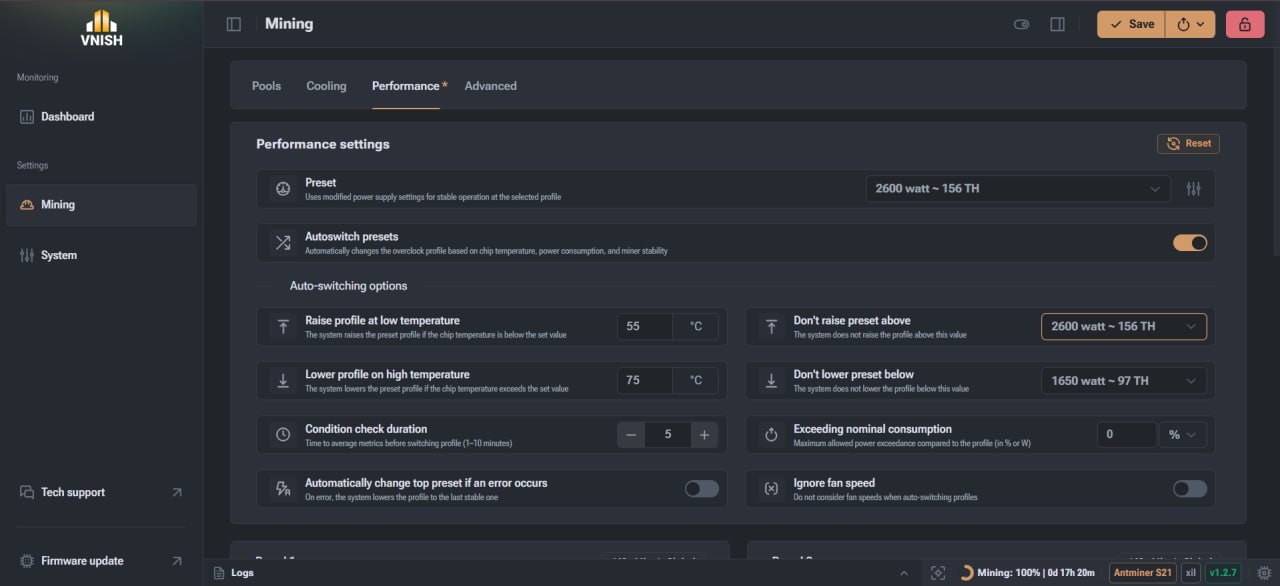
The overclocking profiles feature allows you to quickly manage the miner’s operating parameters without manually entering values.
Each profile contains information on:
- ► Estimated power consumption
- ► Target hash rate
- ► Profile status
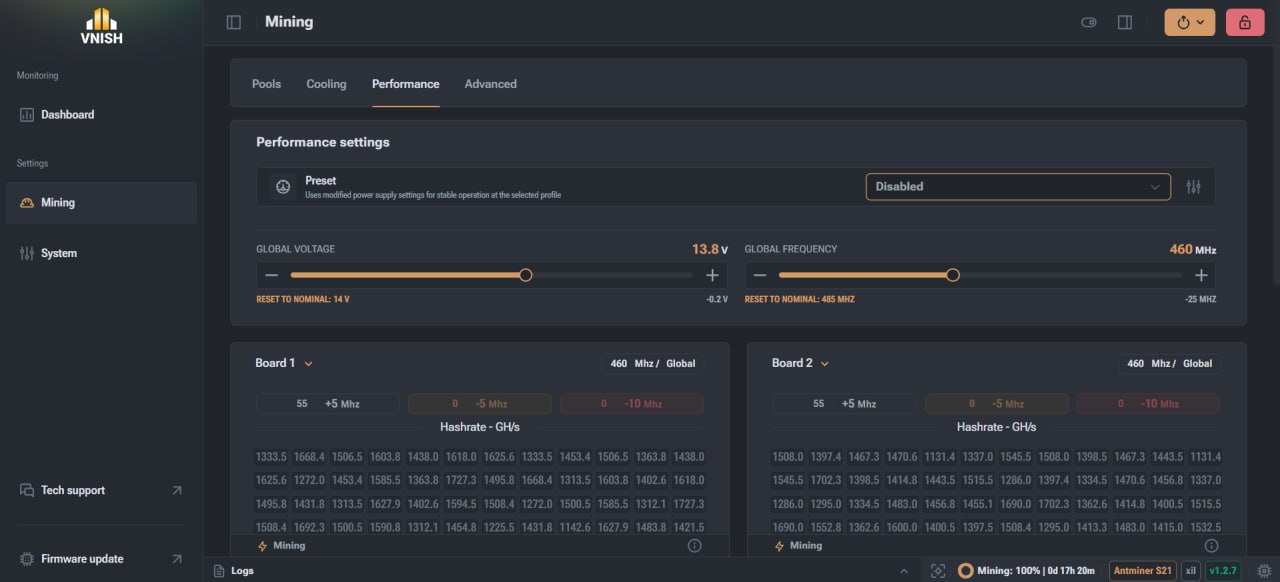
The user can select one or more profiles to run, as well as reset them via a separate control window.
Profile management allows you to:
- View available options
- Select the required profiles
- Reset configured settings
Profiles can be used both manually and in automatic mode when Auto Switch is active.
Auto Switch Presets
The ‘Auto Switch Presets’ function automatically changes presets depending on the miner’s current operating conditions.
The system analyses the following parameters:
- ► Chip temperature
- ► Power consumption
- ► Operational stability
The main purpose of this feature is to maintain a balance between performance, temperature and operational safety without user intervention. In addition to automatic mode, manual frequency adjustment is also available.
Logic for increasing and decreasing the profile
The system can automatically adjust the profile depending on the temperature. If the maximum chip temperature is lower than the set value, the profile is increased. For example, at 67 °C, the system switches to a more efficient mode if the temperature is below this threshold. If the temperature exceeds the set level, for example 75 °C, the system lowers the profile to reduce the thermal load. It is the maximum chip temperature that is used, not the average value.
Parameter analysis time
The time parameter determines how long the system collects and averages metrics before deciding to change the profile. A lower value results in a faster response but may reduce accuracy. A higher value ensures more stable operation but slows down the response. The recommended value is 5 minutes; the acceptable range is from 1 to 10 minutes.
Profile limits
The system allows you to set limits within which Auto Switch will operate. The ‘Don't raise preset above’ parameter limits the maximum profile. Even if conditions permit, the system will not exceed the specified preset. This is used to control energy consumption and comply with infrastructure limitations. The ‘Don't lower preset below’ parameter defines the minimum performance level. This prevents a critical drop in hashrate.
Power consumption control
The ‘Exceeding nominal consumption’ function monitors actual power consumption relative to the values in the profile.
The parameter can be set:
- ► As a percentage
- ► In watts
If consumption exceeds the set limit, the system automatically reduces the profile.
This mechanism is used for:
- ► Protecting sockets and PDUs
- ► Preventing power grid overload
Additional stability parameters
The ‘Automatically change top preset if an error occurs’ function automatically lowers the profile to the last stable one in the event of an error or unstable operation. This allows the system to restore stability on its own. The ‘Ignore cooler speed’ parameter allows fan speeds to be disregarded when deciding to change the profile. This is useful in cases of external cooling control or non-standard airflow systems.
Global voltage and frequency
Global voltage determines the voltage level used by the miner within the selected profile.
Features:
- ► Set directly
- ► Applied without additional logic
- ► Used only in the active profile
Global frequency determines the base frequency for the entire miner. It acts as the upper limit and can be adjusted at the board or chip level. All changes are saved in the profile configuration.
Board and chip frequencies
Each board can have its own frequency value. There are two operating modes available:
- ► Using the global frequency
- ► Setting a custom value
Each chip can also be configured separately. It can operate:
- ► At the board frequency
- ► At the global frequency
- ► At a custom value
This approach allows the miner’s operation to be optimised as accurately as possible.
Board management and data display
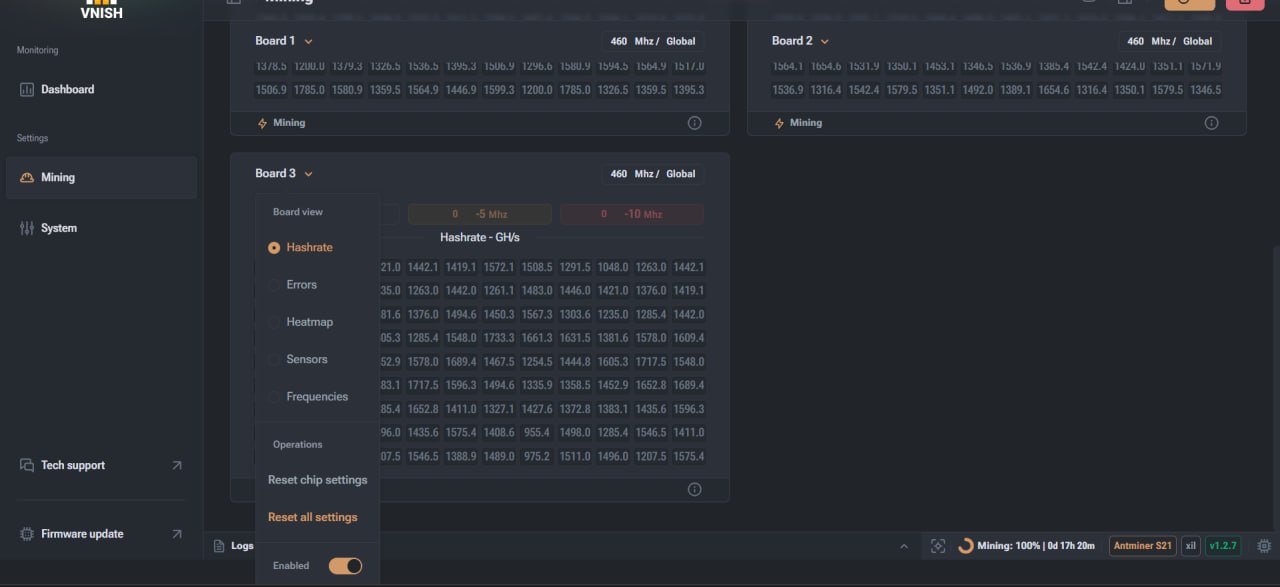
A separate interface is available for each board, allowing you to manage settings and view detailed statistics.
Available display modes:
- ► Hash rate by chip
- ► Rrrors
- ► Frequencies
- ► Heat map
- ► Sensor temperatures
These modes only affect the visualisation and do not alter the operation of the equipment.
Disabling boards
The system allows you to disable individual miner boards. This can be useful in the event of unstable operation or for diagnostics. The method of disabling depends on the miner model. In some cases, this can be done directly within the interface; in others, additional settings are required.
Features of profile operation
When using profiles, all board and chip settings are saved within the profile. When switching to Disable mode, the parameters are not automatically reset and remain in their previous state. To apply global settings, it is recommended to manually reset the settings for each board.
ASIC performance management in Vnish
The ‘Performance’ section in Vnish provides full control over the miner’s operating parameters. It combines automatic adaptation mechanisms with the ability for in-depth manual configuration. Thanks to a flexible system of profiles, temperature control and power consumption management, the user can achieve stable operation of the equipment and the most efficient use of resources.
FAQ
Can I operate without profiles?
Yes, in Disable mode, but then all automation logic is disabled.
Why does the miner lower the profile itself?
This happens when the temperature or power consumption is exceeded, as well as in the event of unstable operation, to prevent errors and overheating.
Is it worth using manual frequency and voltage settings?
Manual tuning allows you to achieve maximum efficiency, but requires testing and stability monitoring.
How can I achieve stable overclocking without errors?
You need to gradually increase frequencies, monitor the temperature and avoid sudden changes in settings.
What should I do if a single board is operating erratically?
You can lower the frequency of that specific board or temporarily disable it for diagnostics.