
The «Advanced» section of the mining settings in the VNISH firmware
The Advanced section in the VNISH firmware is designed to manage low-level system parameters that directly affect the stability, security and automation of the ASIC miner’s operation. These are not merely additional settings, but tools for in-depth control, allowing you to manage the device’s behaviour in non-standard situations, such as a drop in performance, overheating or chip malfunctions This section focuses on the mechanisms responsible for hardware protection, error response logic and the restoration of stable operation. It is important to understand that all changes here are made by the user independently, so any intervention requires a considered approach.
Monitoring mining stability
Restart on low hashrate
The automatic restart function is activated if the miner’s performance drops below a specified value. The user sets this threshold as a percentage of the nominal hash rate. The system constantly compares the actual hash rate with the theoretical one, which is calculated based on the chip frequency and the number of cores. If the current performance drops below the set level, the mining process is automatically restarted. The check does not start immediately after launch, as the system needs time to stabilise its performance. After the initial period, monitoring is carried out regularly at set intervals.
Max restart attempts
This parameter determines how many times the system will attempt to restart the miner in the event of errors.
Possible operating modes:
- ► A limited number of attempts, set by the user
- ► An infinite cycle of restarts when set to 0
This approach allows you to either limit the number of attempts or ensure continuous recovery until stability is achieved.
Chips critical temperature
This parameter determines the maximum permissible temperature. If the set value is exceeded, the system immediately stops mining to prevent damage to the equipment. The system focuses on the hottest chip or sensor, ensuring the most accurate temperature control.
Minimum number of operational boards
This parameter is responsible for checking the operational status of the hash boards. If the number of active boards falls below the set value, the miner stops operating. This prevents the equipment from starting up when some components are not functioning correctly.
Delay before mining starts
This function allows you to set a time interval before the start of operation after the device is switched on. This is necessary to stabilise the power supply and ensure correct system initialisation. A distinctive feature is the use of a random value within a specified range, which helps avoid peak loads on the power grid when a large number of miners are started simultaneously.
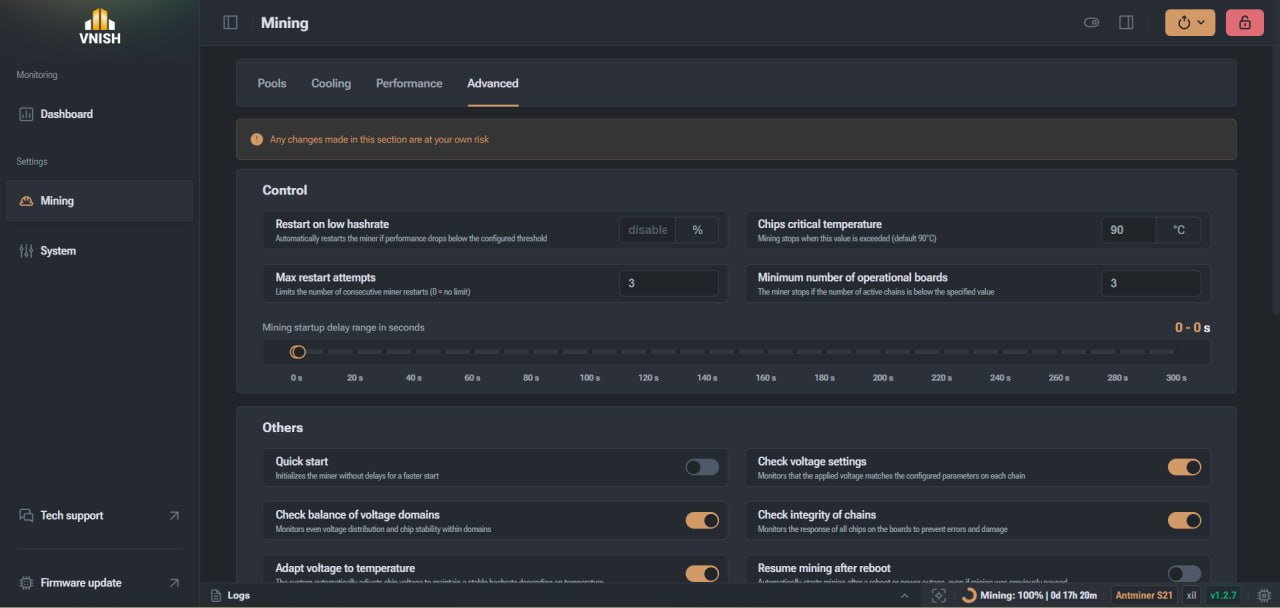
Additional control parameters
Quick start
This option speeds up the initialisation process by disabling some checks. This allows the miner to start up faster, but the effectiveness depends on the specific model. Initialisation occurs much faster, as the system skips all delays associated with pre-start checks. This allows the miner to enter operational mode as quickly as possible and place a load on the equipment. On some devices, delays are built into the hardware logic, so the acceleration may be imperceptible. For example, on certain models, only one sensor is active during startup, and the system needs time to determine the required cooling level. In cases where the cooling process has a fixed duration, for example around 120 seconds, using the quick start feature has no noticeable effect, as this stage cannot be skipped. To understand whether this feature works on your device, it is worth paying attention to the logs during startup. If the miner continues initialisation without a cooling countdown, the quick start will be effective. If, however, a cooling timer is displayed, this feature will not affect the start-up speed.
Voltage balancing control
The system analyses the operation of the chips within voltage ranges. If instability or a significant drop in performance is detected, an attempt is made to restore stable operation. This feature is particularly useful when temperature conditions change, as chips may operate erratically.
Circuit integrity check
The system regularly checks the response of all chips. If a fault is detected, the response depends on the type of equipment:
- ► On devices with a PIC controller, only the faulty board is shut down
- ► On other miners, the entire system is shut down
Resuming mining after a reboot
This option determines the miner’s behaviour after power is restored. The system can either automatically resume mining or restore the previous paused state.
Automatic profile reduction
This function is responsible for automatically reducing the miner’s performance level in the event of overheating or critical errors in the chip circuits. If the system detects unstable operation at the current profile, it switches to a lower level to reduce the load and stabilise the device. The basic logic is that if the temperature is exceeded or a chain break error occurs, the system lowers the preset by one level. This allows for reduced overclocking, lower operating temperatures, and prevents the miner from shutting down completely. Most often, the function is triggered in two situations. The first is overheating, where lowering the profile helps to quickly reduce the temperature. The second is a chain break, which is often linked to the power supply exceeding its limit. In such a situation, the system reduces the load to stabilise operation.
Automatic retune upon chain break
This function is responsible for reconfiguring the profile in the event of critical chip malfunctions. If the miner detects a chain break error whilst operating, the system does not simply restart, but initiates a full reconfiguration process. Once the function is triggered, the current profile is reset, and automatic tuning is initiated if it was active. This allows new parameters to be selected that will be stable under the current conditions. The main causes of such a scenario are a breach in chain integrity or the power supply exceeding its capacity, leading to unstable chip operation. Ultimately, this function does not simply restore the miner’s operation but helps adapt it to real-world conditions, reducing the likelihood of further failures.
Voltage control
This function checks that the actual voltage matches the set parameters. It is available only for miners with PIC controllers and helps prevent the equipment from malfunctioning.
Voltage Adaptation
The system automatically adjusts the voltage depending on the temperature. This allows for a stable hash rate and correct operation of the miner even when external conditions change. The miner constantly monitors the temperature, fan speed and other parameters and, based on this data, adjusts the voltage up or down. This process occurs continuously, allowing for a rapid response to any changes. For example, if the temperature drops, cold chips may require a higher voltage to operate stably. Conversely, if the temperature rises, the system reduces the voltage to minimise heat build-up and prevent instability. The operating logic also depends on the cooling mode. In automatic mode, the system adjusts fan speeds and attempts to reduce voltage as fan speeds increase. In manual mode or with liquid cooling, adjustments are made directly in response to temperature changes, allowing for more precise adaptation to operating conditions.
Special operating modes
This section contains additional modes that allow flexible control of the miner’s behaviour under various operating conditions:
- ► Quiet mode. Limits fan speed during start-up or shutdown. This reduces noise levels but increases cooling time.
- ► Offline mining. This feature allows the miner to continue operating even when there is no connection. It is used to maintain temperature and load stability.
- ► Automatic chip regulation. The system redistributes frequencies between chips to balance temperatures and maintain overall performance.
Dangerous settings
This section lists settings that, if changed, may affect the safety and physical condition of the equipment:
- ► Ignoring temperature sensors. The system can ignore faulty sensors, but only those that do not affect safety. Critical sensors always remain under control.
- ► Disabling boards without a PIC. This function allows you to disable boards even without a hardware controller, but carries a high risk of damaging the equipment.
- ► Voltage boost on startup. A temporary voltage increase helps to initialise chips correctly, but should not be used continuously due to the risk of overheating.
- ► Threshold for identifying weak chips. This parameter determines which chips are considered unstable during autotuning. The depth of optimisation and the overall stability of the system depend on its value.
Full control of the ASIC miner via VNISH Advanced Settings
The advanced settings section in the VNISH firmware provides full control over the ASIC miner’s operation at a level not available in the basic settings. It is here that the device’s behaviour in critical situations is defined, performance is balanced, and hardware protection against overloads and overheating is implemented. Proper use of the Advanced settings allows you not only to improve hash rate performance but also to make the miner’s operation predictable and stable in the long term. Thanks to these tools, you can adapt the equipment to specific operating conditions, including ambient temperature, power supply characteristics and the individual condition of the chips. This section is particularly valuable for those working with a large number of devices or seeking to get the most out of each miner. Automatic recovery mechanisms, error monitoring and flexible parameter control allow you to minimise downtime and avoid critical operational failures. At the same time, it is important to understand that all changes in this section affect the system at a deep level. That is why any configuration must be carried out sequentially, with an analysis of the results and an understanding of how each parameter affects the overall operation of the device. The correct approach to using VNISH’s advanced settings allows you to achieve an optimal balance between performance, power consumption and stability. This makes the firmware an effective tool not only for basic mining, but also for professional management of ASIC equipment.
FAQ
What are the Advanced settings in the VNISH firmware?
The Advanced section contains low-level parameters that allow you to control the operation of the ASIC miner in detail. It includes functions for protection, automatic recovery and mining optimisation. These settings affect the device’s stability, temperature and performance.
Is it safe to change the advanced settings?
Changing parameters in this section requires an understanding of their purpose. Most functions are safe when used correctly, but some settings in the ‘danger zone’ may affect the hardware. That is why all changes are made by the user at their own risk.
When should you use Advanced settings?
This section should be used in cases where the standard presets do not produce the desired result. For example, in the event of an unstable hashrate, overheating, or a change in the miner’s operating conditions. It is also useful for more precise performance optimisation.
How does the restart function work when the hash rate is low?
The system constantly compares the actual hash rate with the theoretical one. If performance drops below the set threshold, the miner automatically restarts. This allows normal operation to be quickly restored without user intervention.
Why is chip temperature monitoring necessary?
Temperature control protects the equipment from overheating. When a critical value is reached, the miner automatically stops. This prevents damage to the chips and extends the device’s service life.
Does VNISH work without an internet connection?
Yes, with the offline mining function enabled, the miner continues to operate even without a connection to the pool. During this time, it does not generate revenue, but maintains operating temperature and load stability.
Why is voltage adaptation needed?
The adapt voltage function automatically adjusts the voltage depending on the temperature. This helps maintain a stable hashrate and prevents overheating or unstable chip operation.
What does automatic preset reduction do?
If the miner overheats or errors occur, the system automatically reduces the performance level. This helps stabilise operation and prevent a shutdown.
Why are some settings dangerous?
Dangerous settings can affect the equipment’s operation at a physical level. For example, disabling boards without a PIC or ignoring sensors can lead to overheating or damage to components. They should only be used with a full understanding of the consequences.
How can you tell if the settings are working correctly?
The effectiveness of changes should be assessed based on the stability of the hashrate, temperature, and the absence of errors in the logs. If, after the changes, the miner operates stably and without failures, the settings have been configured correctly.