
Overview of the Vnish firmware interface. «System» section
The ‘System’ section is responsible for basic device management and covers key parameters that affect the miner’s operation, its network availability and the user-friendliness of the interface. This is where settings related to configuration, localisation, appearance and access control are concentrated.
The interface is divided into three main tabs, each of which performs a separate function:
- General Settings
- Security
- Network
Each of these sections is of practical importance in day-to-day work with the miner, so let’s look at them in more detail.
General Settings: Configuration and Interface Management
This section brings together tools for working with device settings, as well as options that determine the ease of interaction with the web interface.
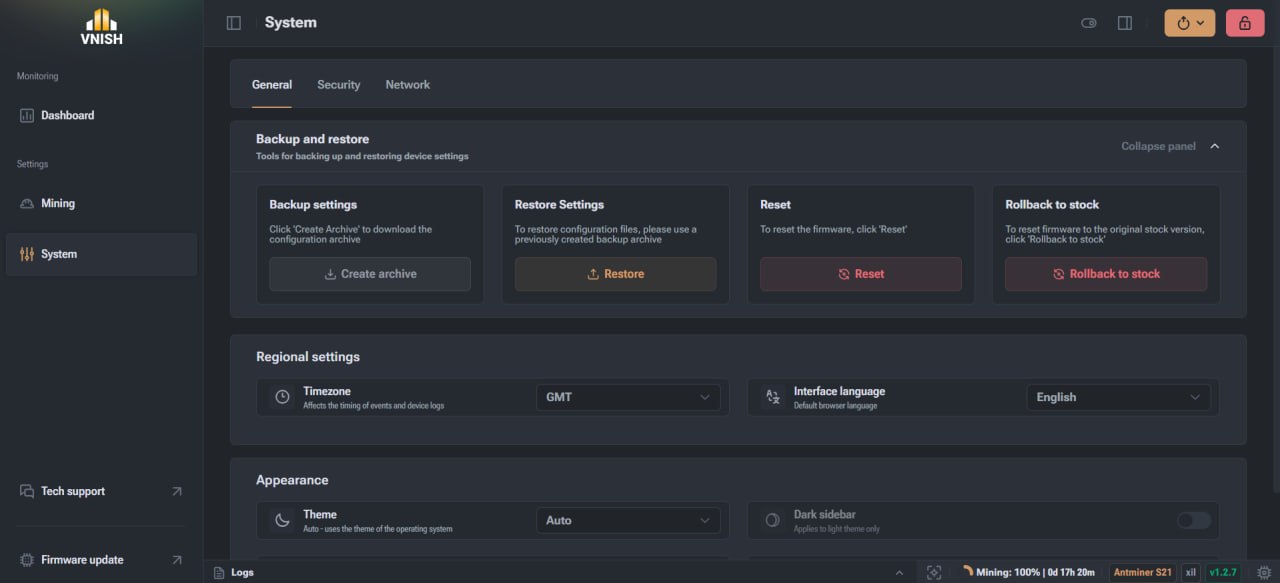
Backing up and restoring settings
This feature allows you to save the current configuration state and quickly restore it if necessary. This is particularly useful when testing different settings.
The following options are available:
- ► Backing up settings A configuration file is created containing the current device settings. It can be saved locally for future use.
- ► Restoring settings Allows you to load a previously created file and restore all settings to their saved state without manual configuration.
- ► Reset settings Resets the current firmware settings to their default values. This is the standard method for resolving configuration errors.
- ► Restore to factory firmware Fully restores the device’s original firmware version.
Regional settings
This section is responsible for localisation and the correct display of data in the system.
- ► Time zone. Determines which time will be used in system logs. This is important for log analysis and diagnostics.
- ► Interface language. Allows you to select the display language for the control panels, which affects the ease of use of the system.
Interface appearance
The settings in this section help you customise the interface to suit your needs and optimise its performance.
- ► Interface theme. You can choose automatic mode or manually set a light or dark theme.
- ► Dark sidebar. An additional option for the light theme, which changes the appearance of the navigation panel.
- ► Interface optimisation. Disables animations and visual effects, which reduces the load on the system and may improve performance.
- ► Display chip numbers. Enables chip numbering in the graphical board view, which significantly simplifies the diagnostic process.
Security
The ‘Security’ section is responsible for protecting access to the miner and the ability to interact with external services.
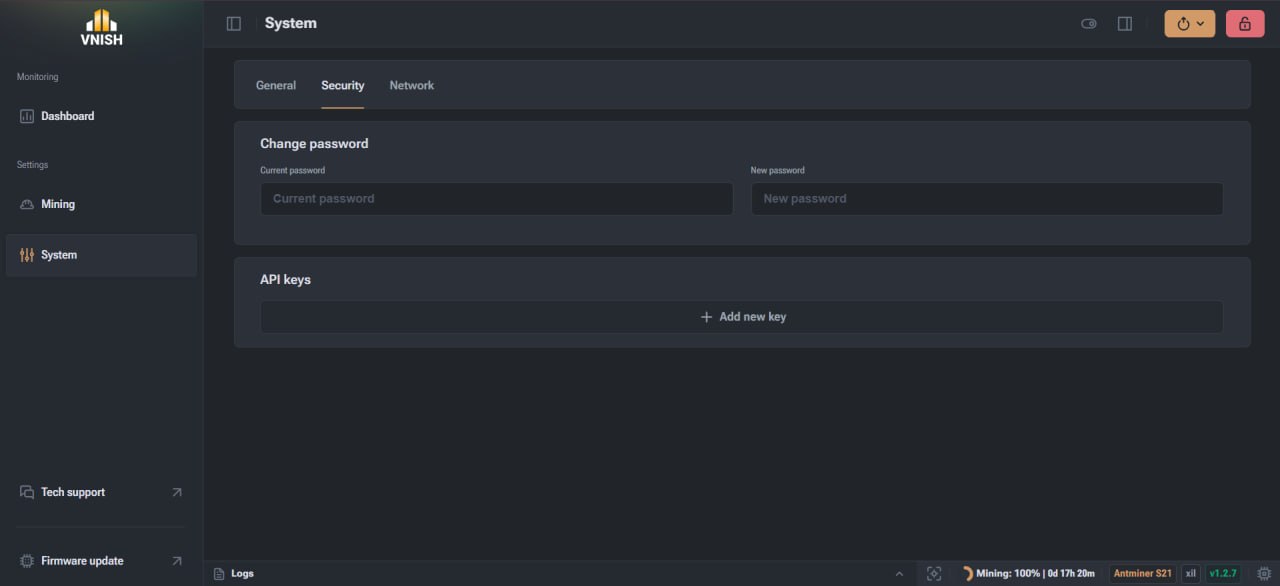
Key features:
- ► Changing the access password. Allows you to update your login credentials for the web interface. To do this, you need to enter your current password and set a new one.
- ► API keys. Used for external control and monitoring of the device. In this section, you can create new keys or delete existing ones.
These settings are directly responsible for protecting access to the device and controlling connections.
Network: miner connection settings
This section contains all network-related settings and determines how the device interacts with the local infrastructure.
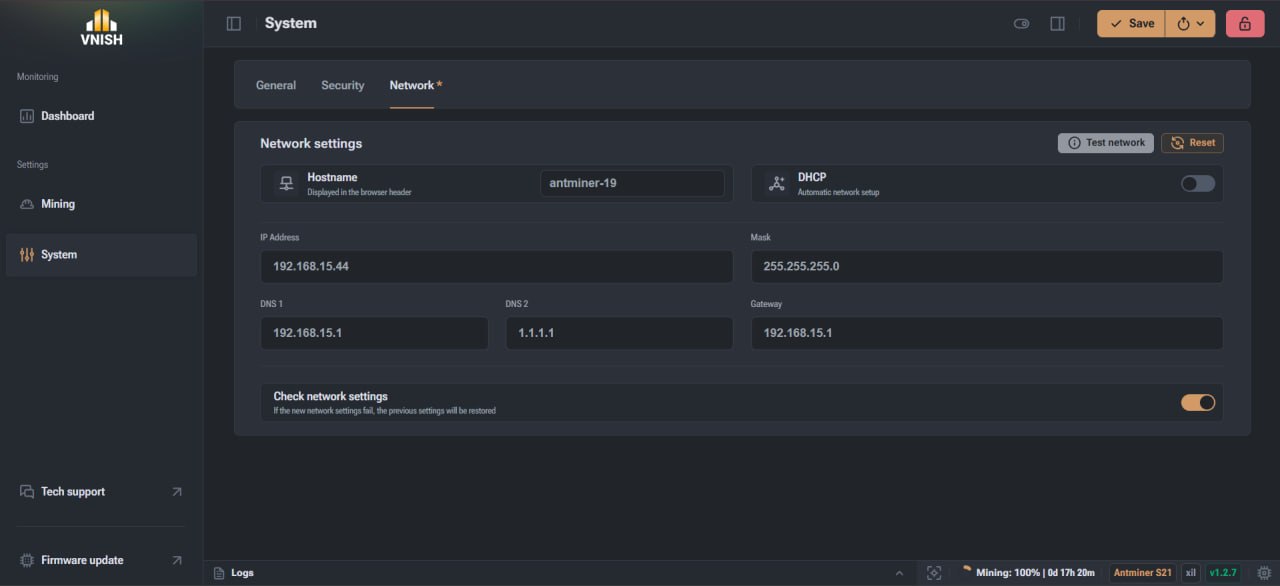
- ► Hostname The device name displayed on the network and in the browser tab. Used for easy identification.
- ► DHCP Mode for automatically obtaining network settings from the router. If enabled, most settings are filled in automatically.
- ► IP address, subnet mask, gateway Display the current network settings. When DHCP is disabled, these settings can be configured manually.
- ► DNS servers Used to correctly determine pool addresses. You can specify a primary and a secondary server.
- ► Network test and diagnostic tools Allow you to check the connection status and network stability, as well as diagnose connectivity with specific hosts using built-in tools, including Ping.
How to use the ‘System’ section effectively
The ‘System’ section forms the basis for managing the miner and allows you to control both basic parameters and critical security and network settings. Proper use of this functionality simplifies device maintenance, speeds up diagnostics and ensures stable operation under various conditions. Correctly configured settings significantly reduce the risk of errors and allow for a quick recovery in the event of failures.
FAQ
How do I save the miner’s settings before making changes?
It is advisable to create a backup before making any changes. To do this, simply use the backup function in the general settings section. The configuration file will be saved on your computer and can be used at any time.
Why change the time zone?
The correct time zone is required for events to be displayed correctly in the logs. This is important when analysing the miner’s performance and troubleshooting.
Why is interface optimisation needed?
This feature disables animations and visual effects. This can be useful on low-spec devices or when accessing the system remotely, where display speed is important.
Why show chip numbers on the boards?
This simplifies diagnostics. If problems arise, you can more quickly identify a specific chip or section of the board.
What do API keys do?
API keys allow you to connect the miner to external services for monitoring or control without having to log in directly to the interface.