
Cloning Miner Settings in HashCore Toolkit
If you are faced with a situation where you need to apply identical settings to a large number of miners, HashCore Toolkit provides a convenient and efficient solution. The cloning feature allows you to transfer configuration from one device to others without manually duplicating parameters, which is especially useful when working with large mining farms. This tool allows you to use an already configured miner as a source and apply its parameters to selected devices in just a few clicks. As a result, you get a consistent configuration across all required miners, simplifying management, reducing errors, and speeding up the setup process. Cloning in HashCore Toolkit is not limited to copying all parameters entirely. The user decides which specific settings should be transferred. For example, you can update only cooling or performance parameters without affecting other configuration sections.
How Cloning Works in HashCore Toolkit
The process is designed to be clear and logical, giving the user full control over each step:
- In the device list, open the context menu of the required miner and select the cloning function.
- At the top of the interface, a bar will appear showing the selected device as the source and the number of available parameters.
- Click this indicator to open the settings selection window.
- Choose the parameters you want to clone. They are grouped, and each item can be disabled individually.
- Select the devices where the chosen settings should be applied.
- Click the clone button in the quick actions panel to complete the process.
Benefits of using cloning:
- ► Fast application of identical settings to a large number of miners
- ► Reduced risk of errors during manual configuration
- ► Flexible selection of parameters to copy
- ► Centralized configuration management
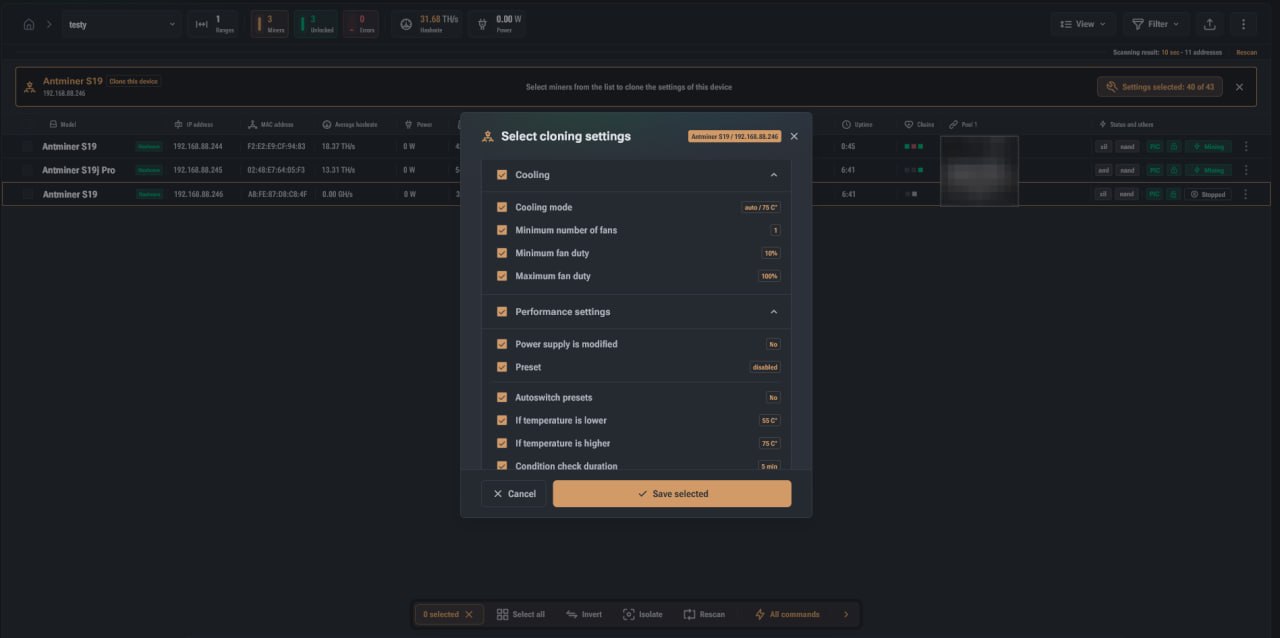
What Parameters Can Be Cloned
In the performance section, you will find parameters that affect overall hardware operation. These include preset configurations, use of autoswitching, and conditions under which these features are activated. Special attention is given to temperature thresholds, which determine how the miner behaves during heating or cooling. In particular, parameters related to cooling and performance are available. You can transfer cooling modes, fan limits, and system behavior under different temperature conditions. This ensures consistent response of all miners to environmental changes without the need to configure each device individually. In the performance section, you will find parameters that affect overall hardware operation. These include preset configurations, use of autoswitching, and conditions under which these features are activated. Special attention is given to temperature thresholds, which determine how the miner behaves during heating or cooling.
In general, the following groups of settings can be identified:
- ► Cooling parameters, including operating modes and fan limits
- ► Performance and preset configurations
- ► Autoswitch parameters based on temperature
- ► System checks and responses to temperature changes
- ► Certain system parameters related to power configuration
It is important to understand that this is not a complete list of available options. As HashCore Toolkit and Vnish continue to evolve, functionality expands, and the list of available settings is constantly updated with new options.
Cloning in HashCore Toolkit as an Efficient Miner Management Tool
The cloning feature in HashCore Toolkit significantly simplifies working with a large number of miners and transforms the setup process into a more structured and controlled workflow. Instead of repeating the same actions on each device, the user can create a proper configuration once and quickly apply it to an entire group of equipment. This approach not only saves time but also ensures stability across the entire infrastructure. Identical settings on miners result in predictable device behavior, which is crucial for monitoring, optimization, and maintenance. The flexibility of the tool allows working with both full sets of parameters and individual configuration parts. This makes it possible to apply targeted changes without affecting other critical settings. Combined with the continuous expansion of available parameters, cloning becomes a universal solution for various use cases. Ultimately, cloning settings in HashCore Toolkit is a practical tool for centralized miner management, enabling rapid infrastructure scaling, maintaining configuration consistency, and reducing manual operations.
FAQ
What exactly is copied during cloning?
Only the parameters you selected in the settings window before starting the process are copied. No other data is modified.
Are settings applied identically to all devices?
Yes, all selected miners receive identical parameters from the source device.
Can the source be changed after the process starts?
You can select a different source device before starting cloning, but after confirmation, the process must be restarted.