
Bulk Pool Configuration in HashCore Toolkit
Working with mining pools is a basic step when configuring miners, but when dealing with dozens or hundreds of devices, manual editing becomes inefficient. HashCore Toolkit provides a dedicated tool that allows you to centrally modify pool connection parameters for a selected group of devices at once. This solution is designed to combine the speed of bulk actions with full control over every change.
How Pool Configuration Works
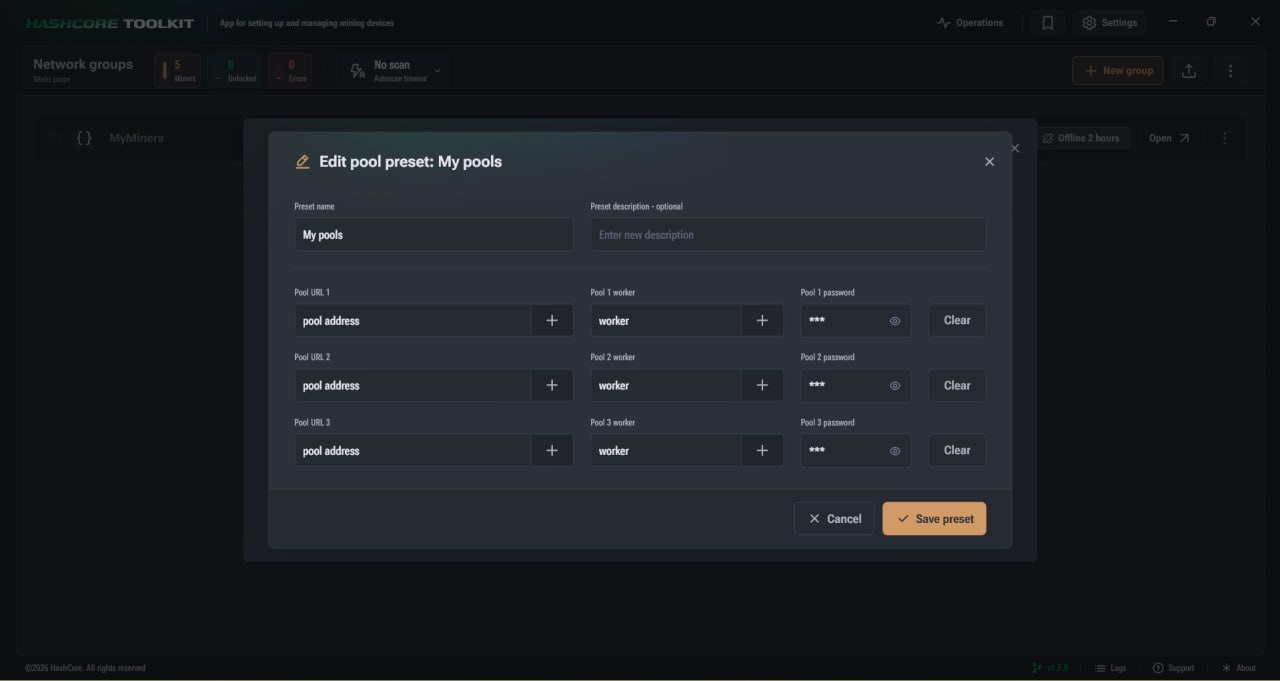
The tool opens a dedicated dialog window where all key pool connection parameters are available. Here you can set the address, worker name, password, and also use templates or previously saved presets.
The interface behavior depends on how many miners are selected:
- ► If one device is selected, all fields are automatically filled with its current values, while the password remains hidden;
- ► If multiple devices are selected, the system inserts universal templates to avoid conflicts between different configurations.
When performing bulk editing, the following template values are used:
- ► URL is formed as {pool_host}:{port};
- ► Worker is set in the format {account}.{worker};
- ► Password corresponds to {password}.
This means the system does not copy exact values from a single miner, but applies a generalized logic suitable for multiple devices at once.
Special attention should be given to the preview mechanism. After modifying any field, the system automatically generates a result showing how the final configuration will look. This preview is based on the first selected device, allowing you to quickly verify the correctness of the entered data.
Visual Control of Changes
The interface not only allows data input but also helps control the editing process. Every modified field is immediately highlighted, making it easier to navigate the configuration. Each field also includes a quick reset option, which is especially useful when working with many parameters.
On the right side of the dialog, the following actions are available:
- ► Revert to the initial state;
- ► Completely clear fields, which effectively removes pools.
This approach allows you to make changes without fear of mistakes, as any modification can be quickly undone.
Using Templates in Pool Configuration
To speed up the process, each field includes a template button. It opens a list of variables that can be inserted into the value.
URL Templates
When forming a pool address, the following variables are used:
- ► {pool_host} defines the protocol and pool address;
- ► {port} specifies the connection port.
This allows generating addresses without manually entering each parameter.
Worker Templates
The system supports an extended set of variables for generating unique worker names. These variables allow automatic name creation based on network parameters or account structure.
Most commonly used variables:
- ► {account} is the part before the first dot;
- ► {worker} is the part after the dot;
- ► {ip} or individual IP octets allow building names based on the device address;
- ► {mac} inserts the MAC address;
- ► {host} uses the device name from network settings.
For automatic numbering, the following format is used: {n:start:step}, {nn:...}, {nnn:...}
This allows generating sequential names with different digit lengths. For example, using a two digit format will produce values such as 010, 012, 014.
How to Work with Templates
- Select the field you want to fill.
- Click the template button.
- Insert the required variables into the value.
- Check the result in the preview.
This approach allows you to quickly generate unique parameters for a large number of devices without manual duplication.
Working with Pool Presets
In addition to templates, the system supports saving ready to use configurations. This is especially useful if you regularly use the same settings.
The creation process is as follows:
- ► Enter the required values into the fields;
- ► Save them as a preset with a custom name;
- ► Later select this preset from the list.
During further editing, additional options are available:
- ► Update an existing preset;
- ► Create a new one based on modified data.
This allows you to gradually build a configuration library that significantly speeds up work with large numbers of miners.
Efficient Pool Management in HashCore Toolkit
Bulk pool configuration in HashCore Toolkit solves one of the key challenges in managing mining infrastructure. When the number of devices grows beyond a few units, manual parameter editing becomes a source of errors and time loss. That is why a centralized approach to pool management is not just convenient but essential for stable farm operation. The implemented tool allows you to treat groups of miners as a single system. Instead of repeating the same actions, the user defines the configuration logic once and applies it to all selected devices. This is especially important when switching pools, updating worker names, or migrating to a different infrastructure. Templates play a key role by automating parameter generation. Using variables helps avoid duplication, create unique values for each miner, and maintain a consistent naming structure. This directly impacts system organization and simplifies monitoring. The preview function adds an essential layer of control. The user can immediately see how the final configuration will look and correct any inaccuracies before applying changes. This reduces the risk of errors and ensures confidence even when managing a large number of devices. Preset support is equally important. Saving configurations transforms one time actions into reusable workflows. In practice, this means routine operations can be completed in just a few clicks without re entering data each time.
From a practical standpoint, the pool management tool in HashCore Toolkit provides the following benefits:
- ► Significant reduction in miner configuration time;
- ► Minimization of human error during changes;
- ► Convenient scaling when expanding a farm;
- ► Consistent configuration structure across all devices;
- ► Fast switching between different pools or accounts.
In conclusion, this functionality enables a transition from manual management to a structured approach. It is especially relevant for those working with large numbers of ASIC miners who aim to maintain stability, control, and predictability in equipment operation.
FAQ
How to change a pool on multiple miners at once?
Select the required devices in the list and open the pool configuration tool. Then set the parameters or use templates. The changes will be applied to the entire selected group.
Why do templates appear instead of actual values when selecting multiple devices?
This is done for configuration standardization. Since different miners may have different parameters, the system uses universal variables that are correctly applied to each device.
How to create unique worker names for each miner?
Use templates with variables such as IP address, MAC address, or sequence numbers. This approach automatically generates unique values.
Can pool settings be saved for reuse?
Yes, after making changes you can save them as a preset. This preset can later be quickly applied to any group of devices.