
Group Settings Configuration in HashCore Toolkit
Managing network groups in HashCore Toolkit provides extensive capabilities for centralized miner management. These groups include tools that allow you to control access to configuration changes, define interaction rules with devices, and precisely adjust network behavior based on specific operating conditions. The main idea behind this functionality is to allow the administrator to control how Toolkit interacts with miners within individual groups. This is especially important in large infrastructures where different types of firmware and devices operate simultaneously. If you have not yet created network groups in HashCore Toolkit, it is recommended to first review the group creation guide, which explains the full setup process from scratch.
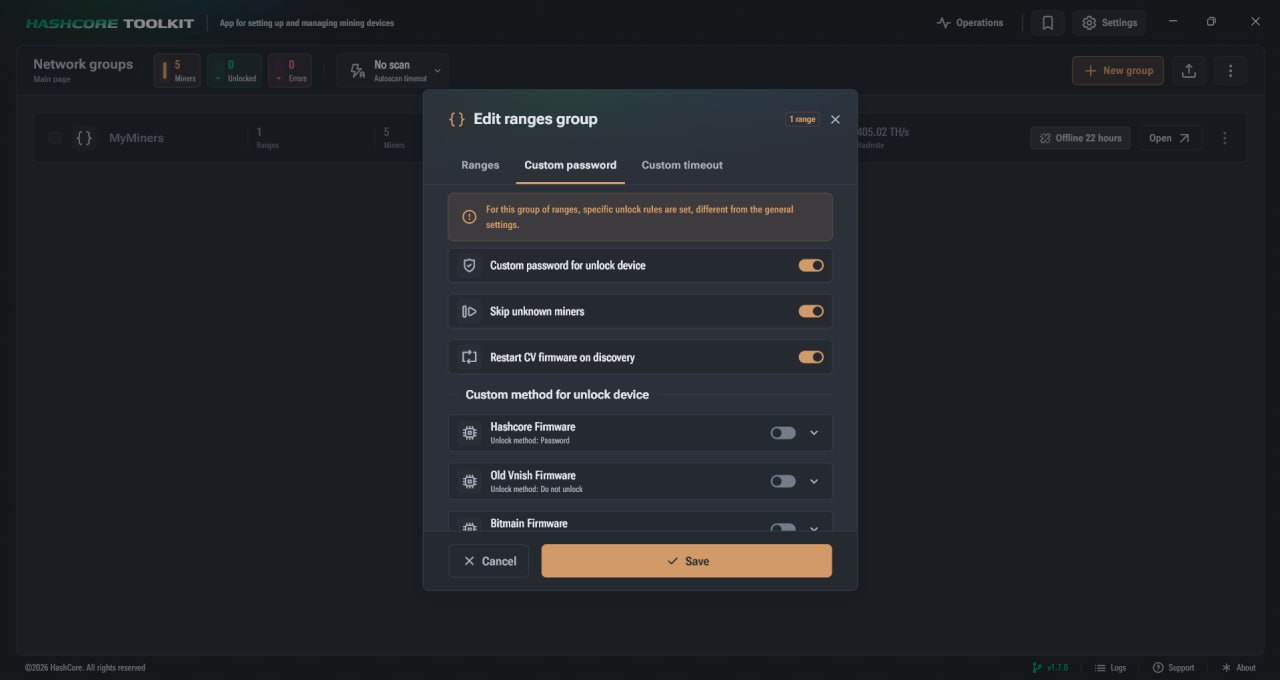
Access Control for Miner Configuration
This section is responsible for configuring access to miner parameter modification features. By default, the ability to change configuration may be restricted, so to enable extended permissions you need to go to the user password settings tab and activate the соответствующая option. Once enabled, it unlocks more flexible management, allowing you to work with different types of authorization and individual parameters for each environment.
Main Device Unlock Parameters
This section contains key settings that define how the system connects to miners and interacts with them during scanning and management:
- ► Authorization methods. Depending on the installed firmware, different connection methods are available. These may include a standard password, an API key, or a combination of login and password. The selected method directly affects compatibility and performance;
- ► Individual passwords. Allows setting unique credentials for different systems and firmware types. This is relevant in environments where solutions from HashCore, Bitmain, and others are used simultaneously;
- ► Skip unknown miners. When this option is enabled, Toolkit ignores devices running unsupported firmware. In this case, the CGMiner protocol is not used, which helps avoid errors during scanning;
- ► Automatic CV recovery. This option for CVITEK based firmware allows automatic startup or recovery of Vnish when a device is detected on the network. This happens directly during the scanning process, significantly simplifying maintenance.
This combination of parameters allows adapting system behavior to different types of hardware and avoiding conflicts between incompatible firmware.
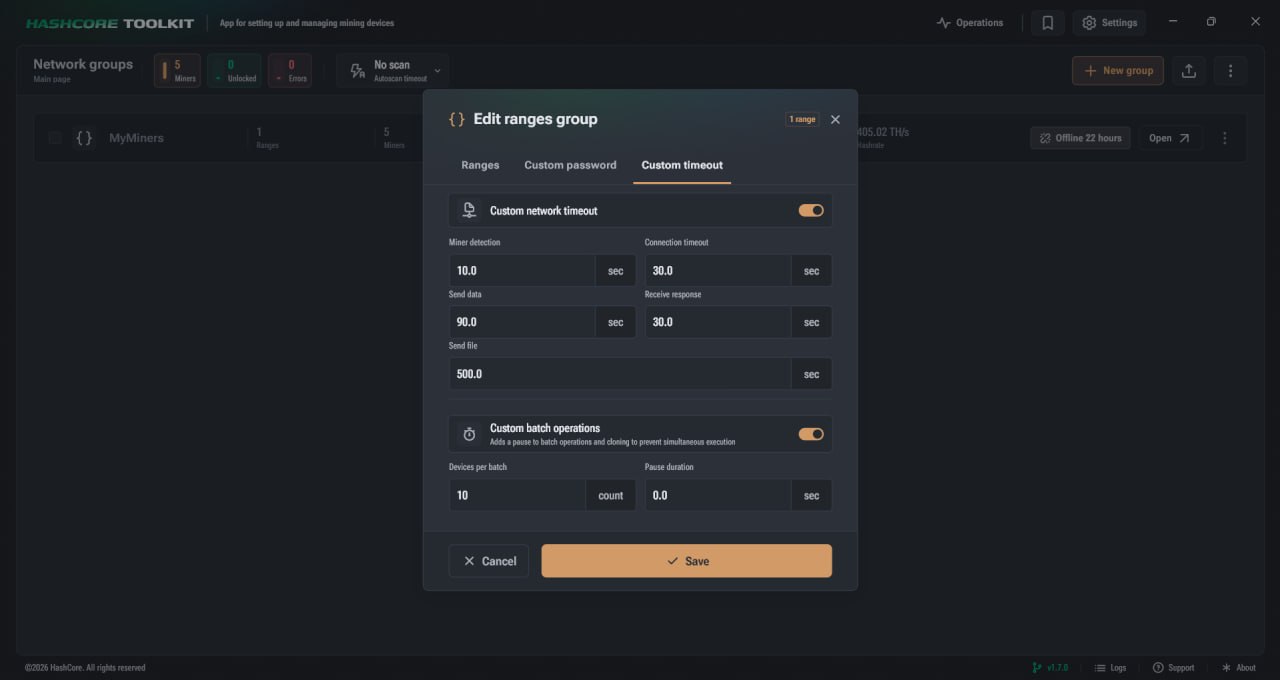
Custom Network Timeout
Properly configured timeouts are essential for stable operation in high load networks or unstable connections. This is especially important when using VPN or working in remote data centers. To activate custom values, go to the corresponding tab and enable the custom network timeout option. After that, precise configuration of each stage of interaction with the miner becomes available.
Main network interaction parameters include:
- Miner detection. Defines the maximum time to wait for the first response from a device during network scanning. If the value is too high, scanning becomes slower. If too low, some devices may not be detected.
- Connection timeout. Defines the time allocated for establishing a TCP connection with the miner.
- Data transmission and response. Allows adjusting how long the system waits for command execution and receiving a response from the device.
- File transfer. Used when working with large data volumes, including firmware uploads. Defines the allowed time to complete such operations.
Configuring these parameters helps avoid connection drops and improves detection accuracy in complex network conditions.
Additional Group Management Features
In addition to basic settings, HashCore Toolkit provides advanced tools for working with groups, allowing automation and significantly speeding up the management of large numbers of miners.
Available features include:
- ► Automatic statistics updates. Enabled via the auto scan timeout in the upper part of the interface. Groups with active status are processed in parallel, allowing multiple groups to be scanned simultaneously;
- ► Group commands. Allow bulk status changes, group merging, or statistics clearing via the control panel. This significantly saves time when working with many devices;
- ► Configuration export. All settings, including passwords, timeouts, and ranges, can be saved in JSON format with UTF 8 encoding. Export is available via the context menu or command interface.
Group Configuration in HashCore Toolkit for Stable Mining and Efficient Device Management
Optimized group parameter management in HashCore Toolkit allows building a clear and predictable system for working with miners regardless of infrastructure scale. With this tool, the administrator gains full control over device access, detection logic, and behavior during network interaction. Properly configured parameters help avoid common issues related to unstable connections, firmware conflicts, or device loss during scanning. This is especially important in environments where different hardware manufacturers and multiple firmware types are used simultaneously. Individual authorization settings and timeout configurations play a key role. They allow adapting Toolkit operation to specific conditions, including VPN usage or high load networks. As a result, the system becomes more stable, responds faster to changes, and reduces errors during miner management. Using group parameters also significantly simplifies scaling. Instead of configuring each device individually, it is enough to define rules once for the group, after which they are automatically applied to all miners within it. This saves time and reduces the impact of human error. In conclusion, proper configuration of group parameters in HashCore Toolkit is a key element for achieving stable mining, optimizing network interaction, and ensuring efficient centralized equipment management.
FAQ
What does configuring group parameters in HashCore Toolkit provide?
It allows centralized miner management, setting access rules, configuring device behavior, and optimizing network performance without modifying each miner individually.
When should network timeouts be adjusted?
This is relevant in cases of unstable internet connection, VPN usage, or heavy network load. Adjusting timeouts helps prevent device loss during scanning.
Why use individual passwords for miners?
This improves compatibility with different firmware and systems, and allows working with multiple hardware types within a single infrastructure.
What happens when skipping unknown miners is enabled?
Toolkit ignores devices with unsupported firmware, helping avoid errors and speeding up the network scanning process.
How does automatic CVITEK firmware recovery work?
When a device is detected, the system can automatically restart or restore Vnish firmware without additional user actions.
Can group settings be saved for later use?
Yes, all parameters can be exported in JSON format, allowing quick restoration or transfer to another system.