
Timeout Settings in HashCore Toolkit
The timeout settings (response waiting times) in HashCore Toolkit determine how the programme waits for a response from ASIC miners, how long it takes to execute network requests, the interval at which it updates statistics, and how many tasks it can run in parallel. This section is important for stable operation with a large number of devices, particularly when the network is busy, some miners are responding slowly, or bulk actions need to be carried out without overloading the hardware. Timeouts affect how quickly HashCore Toolkit processes commands. If the value is set too high, the programme will wait longer for a response from the miners, so scanning the network, updating statistics and performing operations may take longer. Conversely, if the value is set too low, some devices may not have time to respond, meaning the Toolkit may miss a miner or fail to receive the required data from it. The purpose of these settings is not simply to speed up the Toolkit’s operation, but to strike a stable balance between speed, the accuracy of device detection and the load on the network. When working with miners, the programme constantly sends requests, waits for responses, receives statistics, transmits data and executes commands. Each of these actions has time limits. It is these limits that are set in the ‘Timeouts’ tab in the HashCore Toolkit settings. The set of timeout settings alters the parameters for waiting for responses from devices and also affects the number of tasks that can be executed simultaneously. HashCore Toolkit offers several main timeout sections: network timeouts, miner detection, batch operations and advanced settings. Each section is responsible for a separate part of the programme’s operation.
Network timeout
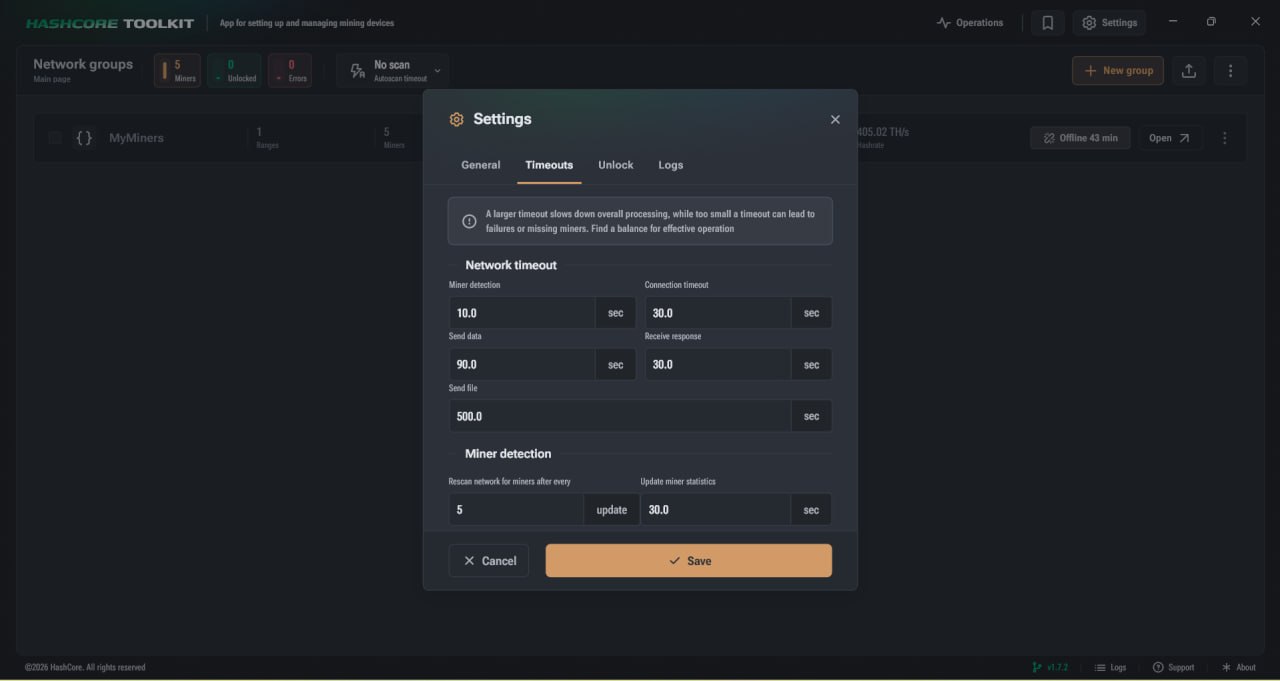
The network timeout in the HashCore Toolkit governs the time limits during the programme’s interaction with miners on the network. These settings determine how long the Toolkit waits for a connection, data transfer, a response or a file to be sent. These settings can be changed not only globally. For each network group, you can override the values in the ‘Custom Timeout’ tab within the group’s settings. This allows you to configure the behaviour of different groups of devices individually if they have different response times or are operating under different network conditions. For instructions on how to create a network group in the Toolkit, please refer to our guide.
Key network timeout settings:
- ► Miner discovery: the time Toolkit spends searching for miners on the network. A higher value makes the scan take longer; a lower value may result in some devices being missed.
- ► Connection timeout: how long the programme waits for a miner to accept the connection.
- ► Data sending: the maximum time allowed for data transfer from Toolkit to the device.
- ► Receive response: how long the programme waits for a response from the miner after a request.
- ► Send file: the maximum time allowed for transferring a file to the device.
Miner detection
The Miner Detection block controls how often HashCore Toolkit updates device statistics and rescans the network group. These settings help control the frequency of requests to miners.
- ► Rescan the network after each: the number of statistics updates after which the Toolkit scans the network again.
- ► Update miner statistics: the pause between updates to device data.
If updates are performed too frequently, the number of requests to miners increases. If the pause is too long, statistics are updated less frequently. Optimal values help to maintain up-to-date data without placing an unnecessary load on the network.
Batch operations
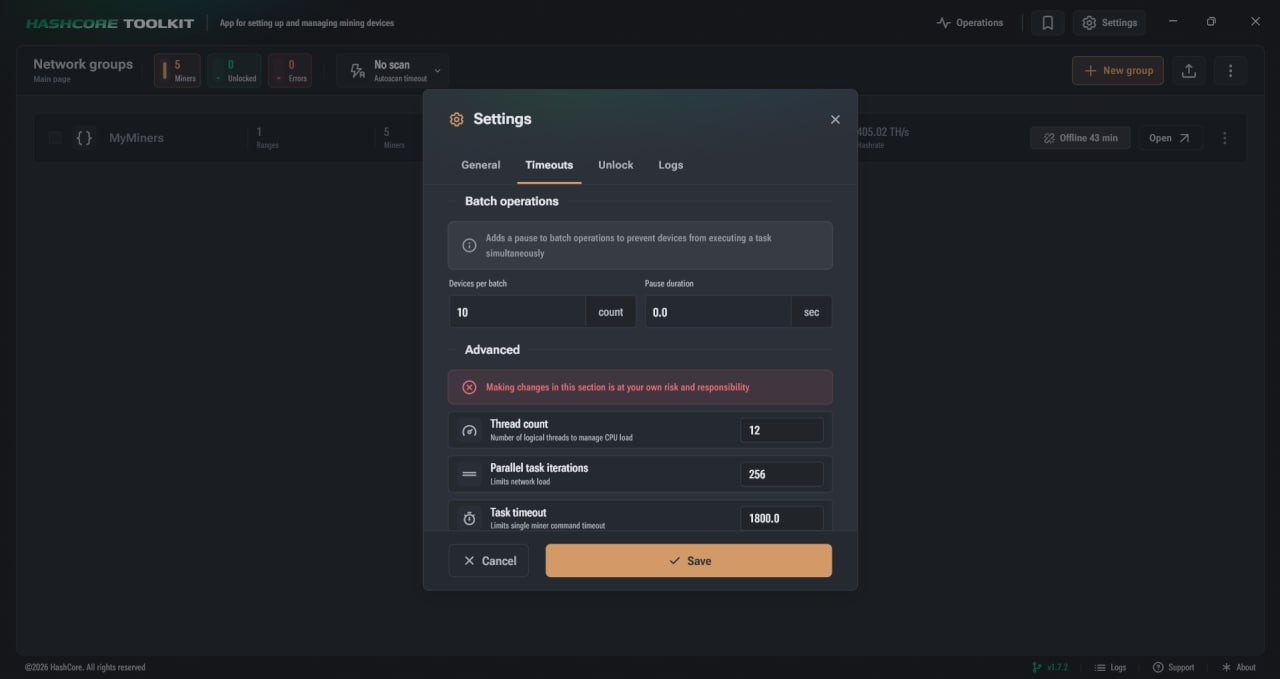
Batch operation settings determine how HashCore Toolkit performs bulk actions on devices. When a command is applied not to a single miner but to a group of devices, it is important to control the number of miners receiving the command simultaneously, as well as the pause between such groups. The ‘Devices per batch’ parameter specifies the number of devices that receive the command without a pause. After processing one batch, the programme moves on to the next, taking into account the set pause. The ‘Pause Duration’ parameter determines the length of the pause between packets. This pause is necessary to ensure that devices do not receive commands all at the same time. This helps to avoid excessive simultaneous load during bulk operations. The batch principle is particularly useful when working with a large number of miners. Instead of executing a command for the entire group simultaneously, the Toolkit divides the operation into parts, making the process more manageable. If you need to quickly apply the same settings to several devices, please refer to the separate guide on cloning miner settings in HashCore Toolkit.
Advanced settings
The advanced settings contain parameters that limit the load on the CPU and network hardware. This section should be adjusted with care, as it affects how HashCore Toolkit processes network data and executes parallel tasks. The number of threads determines the number of system threads involved in processing network data. This setting relates to how the programme distributes the load when handling requests. Parallel task iterations sets the maximum number of network requests that can be sent simultaneously. This parameter limits the network load and helps to control the intensity of parallel processing. The task timeout sets a time limit for the execution of an operation. It is used as a safeguard to exclude hung requests. If an individual task does not complete within the specified time, the limit prevents it from remaining active indefinitely.
How to configure timeouts in HashCore Toolkit
When adjusting timeouts, it is important to take into account the actual behaviour of the network and devices. Certain values may work well on a small network but prove impractical for a large number of miners. Other settings may reduce the number of missed devices but increase the scanning time.
The basic procedure for configuring these settings is as follows:
- Open the HashCore Toolkit settings and go to the Timeouts tab.
- Check the network timeout values for connection, data transmission and response reception.
- Adjust the miner detection settings if you need to change the scan frequency or the frequency of statistics updates.
- Change the batch operation settings if bulk commands need to be executed with pauses between groups of devices.
- Check the advanced settings if you need to limit the number of concurrent requests or the load on the system.
- Save your changes and assess how the Toolkit performs on your network after updating the settings.
Important considerations
When configuring timeouts, it is important to take into account how devices respond on your network. If you increase the value, HashCore Toolkit will wait longer for a response from miners, so slower devices may be handled more reliably. At the same time, network scanning, statistics updates and command execution may take longer. If you set the wait time too short, the process may appear to run faster, but some miners may not have time to respond. In this case, the Toolkit may skip devices or fail to receive complete data from them. Batch operation settings are particularly useful when working with miners running Vnish firmware. The firmware supports a configuration logic that allows HashCore Toolkit to clone settings from one device to others. This eliminates the need to manually configure each miner individually, and bulk changes can be carried out more quickly and conveniently. Advanced settings allow you to control the number of concurrent requests and limit the execution time of tasks. As a result, hung operations do not remain active indefinitely, and the Toolkit operates more predictably. To download the latest version of the Vnish firmware for your miner model, go to the firmware page.
HashCore Toolkit timeouts for stable miner management
Configuring timeouts in the HashCore Toolkit helps manage the wait time for responses from miners, the frequency of statistics updates, the logic of batch operations, and the number of concurrent tasks. These settings affect the stability of network scanning, the speed of command execution, and the overall system load. The network timeout governs connections, data transmission, receiving responses and sending files. Miner detection determines the frequency of rescan and statistics updates. Batch operations allow bulk actions to be performed in stages. Advanced settings limit the load on the processor and network equipment. The main purpose of these settings is to ensure that HashCore Toolkit runs stably with the required number of devices and does not create an excessive load whilst performing network operations.
FAQ
What do the timeout settings affect?
They affect the speed of network scanning, statistics updates, data transfer and the execution of commands for miners.
What happens if the timeout is set too low?
Some miners may not have time to respond, so the Toolkit may skip a device or fail to receive complete data.
What are batch operations for?
Batch operations allow commands to be executed for a group of miners sequentially, without placing a simultaneous load on all devices.
Can timeouts be configured separately for a network group?
Yes, you can set custom timeout values for each network group in the group settings.