
Unlock settings in the HashCore Toolkit
The API unlock settings in HashCore Toolkit control the data that the programme sends to miners to gain access to configuration management functions. It is through these settings that the Toolkit determines how to access the device, which firmware to process, and which miners to skip during scanning or bulk operations. This section is located in the HashCore Toolkit settings window on the ‘Unlock’ tab. Here, you can set general rules for working with firmware, API unlocking methods, and the programme’s behaviour when miners are detected on the network. If the settings are configured correctly, the Toolkit can operate reliably with supported firmware and access functions that modify device settings.
Why is API unlocking required?
API unlocking is required so that the HashCore Toolkit can interact with miners not only by viewing information, but also by changing their configuration. Such actions include operations that require access to device control functions. This is why different access methods may be used for different firmware versions. In the ‘Unlock’ section, you specify the parameters that the Toolkit will apply to devices during operation. If a particular firmware requires a password, an API key or a username and password combination, this information is entered in the relevant field. If the firmware does not need to be processed or does not need to be identified, this can also be configured in the same dialogue box. Working with network groups requires separate consideration. If specific unlock settings have already been defined for a particular network group, these override the current general settings. In other words, the group settings take precedence over the main settings in the Toolkit window.
Priority of settings for network groups
HashCore Toolkit allows you to override the unlock settings separately for each network group. This is useful if different groups use different firmware or different access credentials. For example, one group might contain miners running Vnish (Hashcore) firmware, which uses a password. Another group might contain devices running Bitmain or Canaan firmware, which require a username and password combination. In such cases, there is no need to change the global settings every time. It is sufficient to set individual parameters for the relevant group. If the unlock settings are configured at network group level, these are the settings that will be used when working with devices in that group. The current general settings in the ‘Unlock’ window do not apply to that group. You can read more about how to create a network group in our guide.
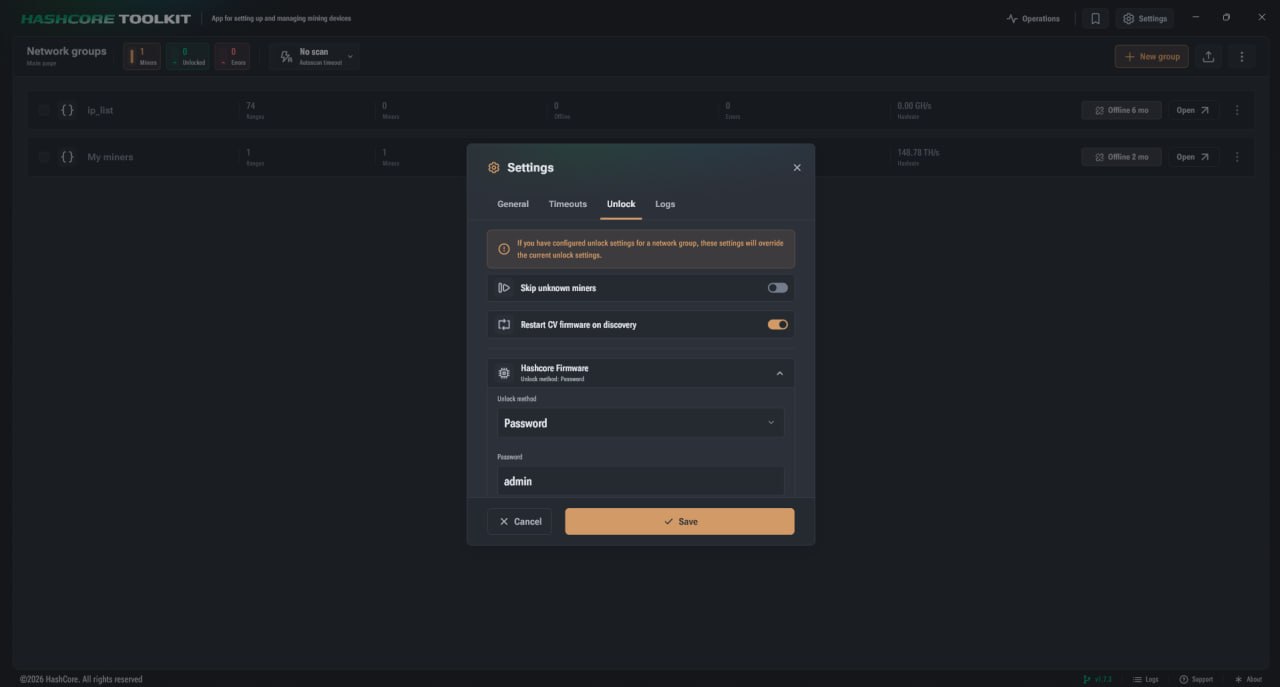
Main settings on the «Unlock» tab
At the top of the tab are toggles that determine the general behaviour of HashCore Toolkit when detecting miners on the network. They affect how the programme will handle unknown devices and miners with CVITEK control boards.
- ► «Skip unknown miners» means that the Toolkit will not use the CG Miner protocol for devices with firmware not supported by HashCore Toolkit.
- ► «Reboot CV firmware on detection» is used to automatically restore or launch Vnish (Hashcore) firmware installed on devices with the CVITEK platform whilst scanning the network.
- ► For each supported firmware, you can select the unlock method individually. This allows you to specify exactly which data the Toolkit should use to access the device.
- ► If a particular firmware does not need to be unlocked or identified, you can select the appropriate option from the list of methods.
Supported unlocking methods
The bottom of the settings window lists the firmware versions that the HashCore Toolkit can work with, as well as the available API unlocking methods. The set of available options depends on the specific firmware version.
The following methods may be available for different firmware versions:
- Password.
- API key.
- Username + password.
- Do not unlock.
- Do not detect this firmware.
The «Password» method is used when simply entering a password is sufficient to access the API. Taking the Vnish (Hashcore) firmware as an example, the value «admin» can be entered in the password field. Once this method is selected, the Toolkit will use the specified password to work with devices of the corresponding type. The «API key» method involves the use of an access key. This option is only applicable to firmware that supports it. The «Username + Password» method is used for firmware that requires a full set of login credentials. In the settings, this method can be applied to Bitmain or Canaan firmware if this is the method specified for the relevant firmware type. The «Do not unlock» option means that the Toolkit will not perform API unlocking for the selected firmware. This mode can be set if access to configuration change functions for this firmware is not required. The «Do not detect this firmware» option is used when a particular firmware should not be processed during device detection. In this case, the Toolkit will not treat it as a supported firmware within this dialogue box.
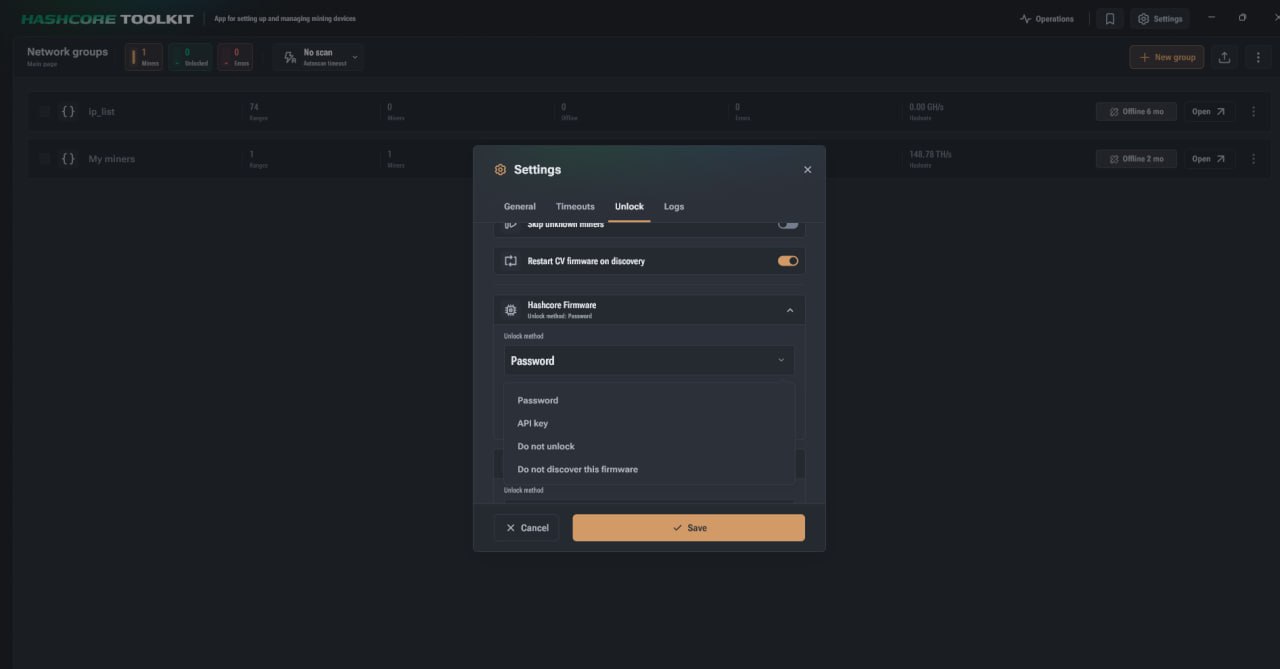
Configuration examples for firmwares
In the list of supported firmwares, each entry has its own name and current unlock method. This allows you to quickly check which access method is currently being used for each type of firmware. For Vnish (Hashcore) firmware, the «Password» method can be selected. Upon opening the entry, the user will see the «Unlock method» field and a field for entering a password. If the password «admin» is specified, this will be used to access devices with this firmware. For Bitmain firmware, the «Username + Password» method can be used. This means that to operate such devices, you must enter your login credentials in the form of a username and password. For Canaan firmware, the «Username + password» method can also be used if this option is selected in the settings.
How to save API unlock settings
After selecting the required settings for the firmware, click the «Save» button. Until this point, the changes remain in the settings window and are not applied permanently. If you need to exit without applying the changes, you can click «Cancel». In this case, the new settings will not be saved. Before saving, you should check that the correct methods have been selected for each firmware version. This is particularly important when there are devices with different firmware types on the same network. Selecting the wrong method may prevent the Toolkit from gaining the necessary access to the API functions required to change the configuration.
What to bear in mind when configuring
The «Unlock» section affects how HashCore Toolkit will interact with devices whilst scanning the network and performing configuration-related actions. If multiple network groups are in use, bear in mind the priority of group settings. These may override the current settings specified in the general settings window. You should also carefully configure the handling of unknown miners. If the option to skip unknown devices is enabled, the Toolkit will not use the CG Miner protocol for firmware that is not included in the list of supported firmware. This prevents the Toolkit from interacting with devices that are not supported by the programme. The «Restart CV firmware on detection» setting applies to devices on the CVITEK platform. It is responsible for automatically restoring or launching Vnish (Hashcore) firmware during a network scan. It is also worth reviewing the section on general settings in the HashCore Toolkit, as this is where the programme’s basic operating parameters are configured prior to network scanning and miner management.
Configuring API unlocking in the HashCore Toolkit for stable operation with miners
The API unlock settings in the HashCore Toolkit are required for the correct operation of miners, firmwares and network groups. This section defines the methods for accessing firmwares, the rules for handling unknown devices and the Toolkit’s behaviour when detecting firmwares on the CVITEK platform. Correctly configured parameters allow the Toolkit to use the appropriate access method for each supported firmware. If specific parameters are set for a network group, they take precedence over the general settings. For this reason, before saving, it is advisable to check not only the selected unlocking methods, but also whether they have been overridden at the level of a specific group.
FAQ
What are the API unlock settings in HashCore Toolkit for?
They are required so that the Toolkit can access the miner’s API functions and work with the device’s configuration settings.
Where are the API unlock settings located?
They are located in the HashCore Toolkit settings window on the «Unlock» tab.
Which API unlock methods are supported?
Depending on the firmware, the following options may be available: password, API key, username and password, as well as the options «Do not unlock» or «Do not detect this firmware».
What does the «Skip unknown miners» option mean?
This option disables the use of the CG Miner protocol for devices with firmware not supported by HashCore Toolkit.
Can network group settings override the general unlock settings?
Yes. If a network group has its own unlock settings specified, these take precedence over the general settings.