
Logs in VNISH and how to create a diagnostic report from a miner
The VNISH firmware provides convenient tools for analyzing the operation of an ASIC miner. The user can view system logs at any time and also generate a complete diagnostic report for technical support or for independent troubleshooting.
In this guide we cover:
- ► Where logs are located in the VNISH interface;
- ► Which types of logs are available;
- ► Two ways to create a diagnostic report;
- ► What happens after the report is created.
Where to find miner logs in the VNISH interface
All main miner activity logs are available directly from the main firmware screen.
How to open logs:
- Log in to the miner web interface with VNISH firmware.
- Go to the main Dashboard page.
- At the bottom of the screen open the Logs panel.
- The log panel expands over the interface without switching to another page.
The Logs section includes the following tabs:
- ► Status Displays the overall miner state and key events.
- ► Miner Contains mining start logs, process stops, errors, and messages from the miner.
- ► Autotune Shows the automatic tuning process for frequencies and voltages.
- ► System Displays system events, reboots, service initialization, and hardware components.
The Miner and System tabs are most often used to identify the causes of unstable operation.
Method 1. Creating a diagnostic report through the Tech support section
This is the main and recommended way to generate a report.
How to create a report via Tech support:
- In the left side menu click Tech support.
- In the window that opens select Diagnostic report.
- In the Description of the problem field briefly describe the issue. For example the miner is rebooting or mining does not start.
- Click the Create report button.
- Wait until the report generation is complete.
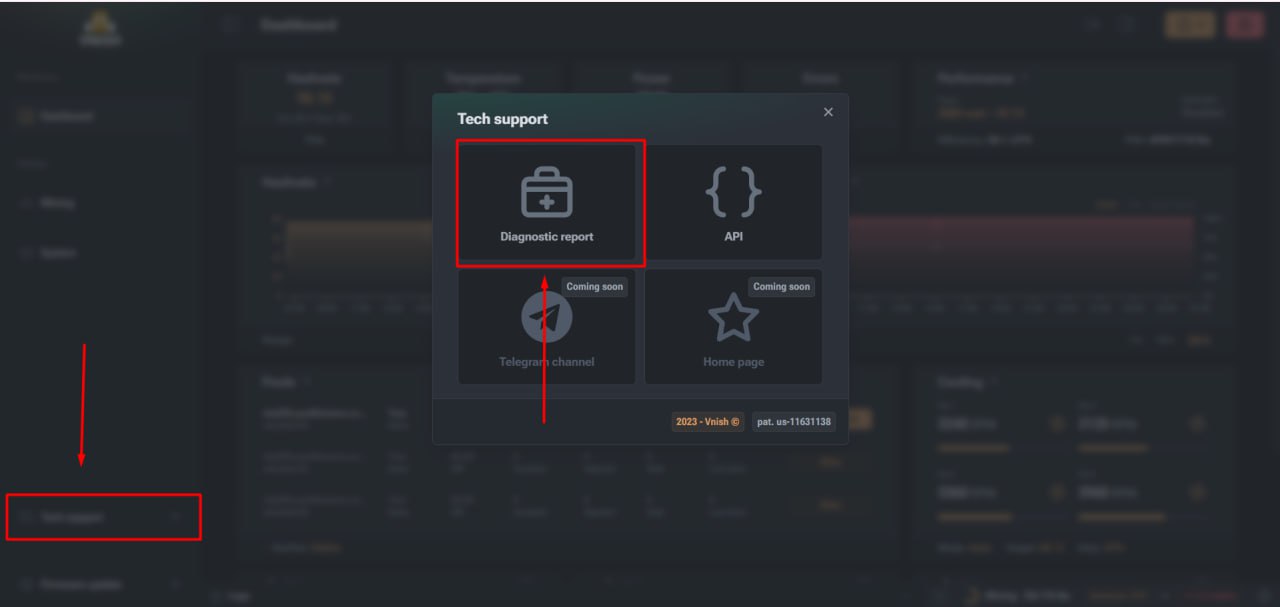
During report creation VNISH automatically collects:
- ► System logs;
- ► Mining logs;
- ► Hashboard information;
- ► Temperatures and fan speeds;
- ► Power parameters;
- ► Firmware configuration.
After the process is complete the finished diagnostic report is automatically downloaded to your device.
Method 2. Creating a diagnostic report directly from the Logs section
The second method is available directly from the Logs panel and is convenient when you are already analyzing errors.
How to create a report via Logs:
- Open the Logs panel on the Dashboard page.
- In the upper right part of the log panel find the diagnostic report icon.
- Click this diagnostic report icon.
- In the window that appears describe the problem.
- Click Create report.
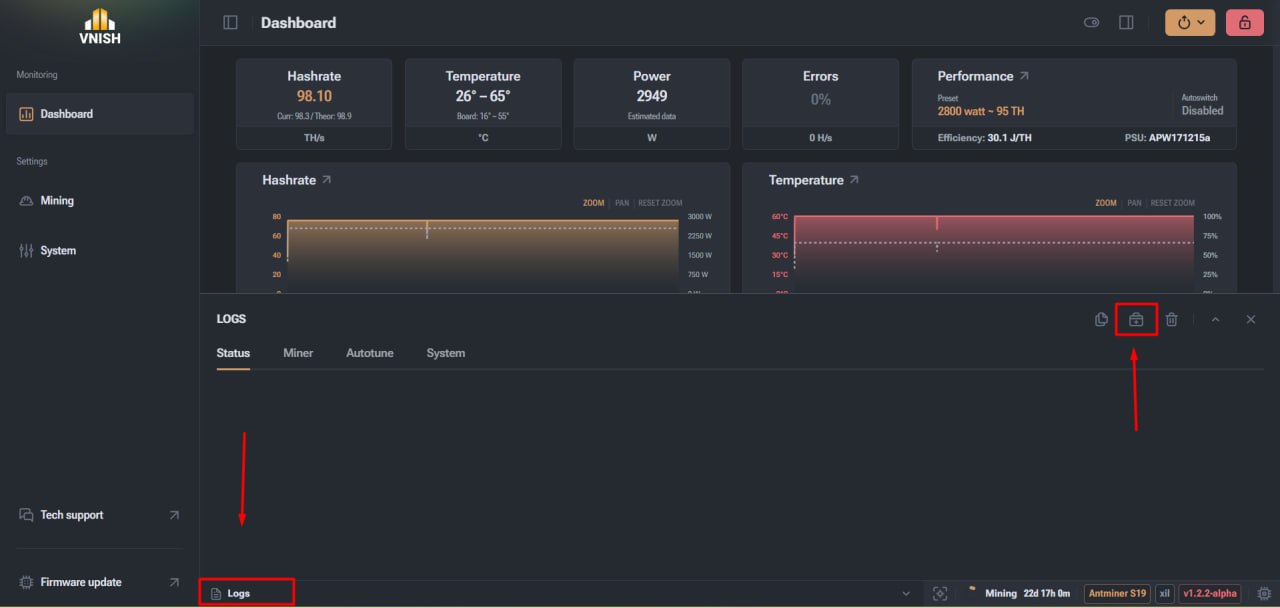
This method allows you to create a report without switching to the Tech support section and is especially useful for quickly capturing an error.
The result is identical to the first method. The diagnostic report file is also automatically downloaded to the user device.
When you should create a diagnostic report
It is recommended to generate a report in the following cases:
- ► The miner reboots regularly;
- ► Mining does not start;
- ► Some hashboards are not detected;
- ► Errors appear in the logs;
- ► You need to contact technical support.
It is important to create the report without resetting miner settings and without reflashing the miner so that the logs retain accurate information about the issue.
Everything under control with VNISH
The VNISH firmware provides a clear and user friendly mechanism for working with miner logs and diagnostics that allows the user to fully control the device state without using third party tools. All key logs are available directly from the Dashboard which makes it possible to quickly review the current miner status, analyze errors, and track system events. When needed the user can create a full diagnostic report in two ways either through the technical support section or directly from the log panel while analyzing a problem. After the report is created the finished file is automatically downloaded to the user device which makes it easy to send it to technical support or use it for independent analysis. This approach significantly simplifies troubleshooting, minimizes equipment downtime, and speeds up the resolution of technical issues.